Internet speed for gaming: How fast do you really need?


Choosing the right internet speed for gaming starts with understanding what your ISP actually delivers. Latency, jitter, and overall stability matter more than fast download and upload speed when it comes to avoiding lag and keeping gameplay smooth.
In this article, we’ll break down the minimum and ideal internet speeds for different gaming styles and devices, help you understand what your speed test results really mean for your gaming experience, and share tips on improving your connection.
How internet speed works for gaming
When gaming, your overall internet performance is determined by three factors: latency, upload speed, and download speed. Each one affects different parts of your connection. Running a speed test under your usual gaming conditions helps you see whether these elements are performing well enough for the type of gaming you want to do.
Latency
Latency is the time it takes for data to travel to and from a game server. It's commonly measured using ping and recorded in milliseconds (ms).
If you have high latency, you’ll notice a delay between your actions and what happens on screen. Games feel less responsive because your device takes longer to exchange data with the server, which can affect performance in critical moments. Lower latency means your inputs register with less delay.
Latency is primarily affected by your physical distance from the game server, your network routing quality, and whether you’re using a wired or wireless connection.
Download speed
This is the rate at which your device receives data from the internet. It affects things like game downloads, updates, and any information sent from the game server to you during online play. It’s measured in megabits per second (Mbps).
Download speed usually has little effect on active gameplay because online games use very little data. However, very slow speeds can cause delays when downloading updates, syncing with game servers, or receiving large amounts of data during matchmaking.
Download speed depends on your internet plan, network congestion, and the infrastructure of your internet service provider (ISP).
Upload speed
This determines how quickly your device can send data to the internet. It affects actions you send to the game server, such as movement, inputs, and voice chat, as well as any content you upload. Like download speed, it’s measured in Mbps.
Upload speed doesn’t need to be high for gaming, but it does need to be stable. Very low or congested upload bandwidth can cause issues like delayed actions, voice chat dropouts, and stutters when your device sends data. While latency is the primary factor in responsiveness, a stable upload connection helps ensure your inputs and voice chat reach the server without interruption.
Shared network use, your ISP’s upload capacity, and interference on wireless connections can all impact your upload speed.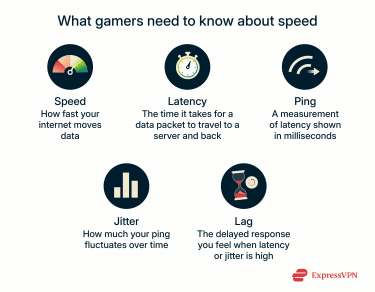
Technical factors that impact gaming performance
Your online speed is just one part of what makes your online gameplay run smoothly. Even with a fast internet connection, other technical factors can affect game quality.
What is ping, and why does it matter?
Ping is often used synonymously with network latency. It measures how long it takes a small data packet to travel from your device to a game server and back, reporting the delays in ms. A lower ping means less gaming latency.
Ideal ping for different game types
Different games tolerate different latency levels. Competitive and fast-paced genres require much lower ping, while slower or turn-based games can handle higher values without significant impact.
Here are some examples of ideal ping ranges for different types of games:
- Competitive shooter and fighting games: 20–40ms.
- Racing games: 20–50ms.
- Real-time strategy: Ideally under 100ms.
- Massively multiplayer online (MMO) games: Playable up to 150ms, but lower is better for person versus person (PvP) or raids.
When does lower ping stop making a difference?
There comes a point at which lowering your ping no longer makes a noticeable difference. Your screen updates at a certain speed, called the refresh rate, and ping is comparable to this value.
Each device has a minimum frame time based on its refresh rate. For example, on lower-end gaming PCs or older consoles like the PS4, which often run games at 60 frames per second (fps) or are paired with 60Hz monitors, each frame takes about 16.6ms to render. In these cases, a ping of around 16.6ms means your input will typically register within one frame delay, and improvements below this ping become almost impossible to notice.
Note that more powerful systems like the PS5, which runs at 120fps, refresh every 8.3ms; 144Hz monitors refresh roughly every 6.9ms; and 240Hz monitors refresh roughly every 4ms.
However, as a general rule, lower ping constantly improves latency, but the practical benefit becomes small at very low values (e.g., below 10–20ms).
What is jitter?
Even if your ping is in the acceptable range, high network jitter can cause lag spikes, delayed actions, and choppy movements. Jitter is the variation in the delay between data packets reaching your device. Instead of arriving at a steady, predictable rate, the timing jumps around because of network congestion, timing drift, or changes in routing.
Internet speed needs by gamer type
Super-fast speed isn't that important if you play slow-paced games like Civilization or City Skylines. However, you do need a stable connection, and most home plans can handle them without any issues.
In contrast, if you're playing MMOs or competing in eSports, the demands on your network are much higher, not because they use more bandwidth, but because they rely heavily on low latency, fast server syncing, and stable real-time communication.
Minimum internet speed for casual gamers
Online gameplay uses very little bandwidth, often less than 1Mbps. However, higher speeds are helpful for downloading games, updates, and patches efficiently.
For most casual gamers, the following ranges are generally acceptable:
- Ping: Under 75ms.
- Download speed: 1–5Mbps for steady gameplay; 25–50Mbps for quick downloads, updates, and patches.
- Upload speed: 1–3Mbps is sufficient for online play and voice chat; higher speeds of 5–10Mbps or more are recommended for streaming and multitasking.
Most high-speed internet plans should be able to handle these speeds. However, speed levels vary by country, so it’s essential to check with your local provider to find the exact plan you need.
Optimal internet speed for competitive gamers
For competitive gaming, aim for:
- Ping: Under 20ms.
- Download speed: 25–50Mbps for fast downloads and multitasking.
- Upload speed: 5–10Mbps for consistent server communication and uninterrupted voice chat.
Speed recommendations by gaming platform
The Federal Communications Commission (FCC) has recommended speed guidelines for broadband usage. It says that for game consoles connecting to the internet, you need at least 3Mbps download speed, and for online multiplayer games, the recommended minimum download speed is 4Mbps.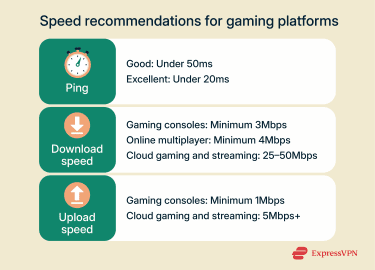
Minimum internet speed for PlayStation (PS4/PS5) gaming
Sony doesn’t publish any official guidelines regarding internet speeds for PS4 and PS5, but here are some good benchmarks to follow:
- Ping: Ideally under 50ms for responsive gameplay.
- Download speed: Minimum of 3–5Mbps, but 25–50Mbps is recommended for smoother multiplayer sessions and faster game downloads.
- Upload speed: Minimum of 1Mbps for basic gameplay, but you’ll need 5–10Mbps or more if streaming gameplay or multitasking.
Note that cloud gaming or streaming via PlayStation Plus typically requires higher internet speeds.
Required Mbps for Xbox Series X/S and Xbox One
Even though Microsoft doesn't specify different speed requirements for the Xbox One, Series X, or Series S, the same benchmarks listed above for PS5 and PS4 provide a reliable baseline:
- Ping: Under 50ms is perfect for smooth online play.
- Download speed: A minimum of 3Mbps is needed for gaming without lag, but aim for 25–50Mbps for faster updates or when connecting multiple devices simultaneously.
- Upload speed: 1Mbps is needed for general online play, but 5–10Mbps is better for gaming while using voice chat or streaming.
Recommended connection speed for Nintendo Switch and Switch 2
Nintendo recommends comparing your speed against the ideal speeds listed below. Even though it doesn't mention latency, the lower the ping, the better, as portable mode suffers on crowded public networks.
- Ping: A latency below 50ms is needed for uninterrupted gaming.
- Download speed: A minimum of 3Mbps is required. However, the Switch is more sensitive to Wi-Fi congestion. Having at least 10–15Mbps download speed is better for smooth performance, especially with fast-paced games like Super Smash Bros.
- Upload speed: 1Mbps is all that's needed to play Switch and Switch 2 without any issues.
Optimal internet speed for PC gaming (multiplayer and downloads)
The speed you need to play online games via PC depends on the type of game you play. Single-player games don't require super high speeds, but graphics-intensive games might. Steam Remote Play performs best at 15–25Mbps download with around 5Mbps upload.
The ideal ranges for PC gaming are:
- Ping: The standard range for PC gaming is less than 50ms, but if you're playing competitively, less than 20ms is ideal.
- Download speed: 3–5Mbps is enough for less data-intensive games. This is also true of the Steam Deck. However, aim for 25–50Mbps for online multiplayer games, frequently streaming or downloading large patches.
- Upload Speed: At least 1Mbps is usually required for a decent gaming experience.
Good speeds for mobile gaming
Like with consoles, mobile gaming requires minimal download and upload speeds. Tablets may benefit from slightly higher speeds because larger screens and higher resolutions demand more bandwidth for smooth video streams.
- Ping: Under 50ms (or as low as your mobile carrier allows) is ideal for quick, continuous updates between you and the servers.
- Download speed: 3Mbps is suitable for games such as puzzles, turn-based titles, or solo role-playing games (RPGs). 15Mbps or higher is usually needed for fast-paced shooters, multiplayer online battle arenas (MOBAs), and battle royale titles, especially on shared Wi-Fi or when background apps are updating.
- Upload speed: A minimum of 1Mbps and a stable connection is enough for casual gaming.
- Mobile cloud-gaming services: 20Mbps or higher download speeds typically work best, along with a stable 5 GHz Wi-Fi or a strong 4G or 5G signal.
Speed requirements for cloud gaming platforms
Cloud gaming requires faster speeds than regular online play because everything is streamed to your device in real time. Cloud gamers should expect slightly higher ping as a result. Here are the estimated internet speeds for the most popular cloud-gaming platforms:
- Ping: Under 20ms is excellent for cloud gaming, especially playing fast-paced games, but 20–40ms is good enough for most.
- Download speed: Generally, at least 5–10Mbps is required. But some cloud gaming services recommend higher download speeds.
- Sony recommends a minimum of 5Mbps for establishing a cloud streaming session on PlayStation Plus but suggests a minimum of 13Mbps for streaming in 1080p.
- Xbox Cloud Gaming users should aim for a minimum of 10Mbps for streaming in 720p.
Amazon also recommends a minimum of 10Mbps for Luna. - For GeForce NOW, NVIDIA recommends at least 15Mbps for high definition (HD), 25Mbps for full high definition (FHD), and 45Mbps or higher for 4K streaming.
- Upload speed: A stable upload speed of at least 5Mbps is important for gaming without significant delays.
Wired vs. wireless internet for gaming
Your choice of connection type directly impacts the speeds and stability you experience while gaming. A wired Ethernet connection is the most stable option because it reduces latency, keeps jitter low, and avoids interference from walls or other devices by creating a direct path to your router, so your signal isn’t fighting interference or distance the way Wi-Fi does. If your gaming setup supports wired connections, it's the recommended option.
That said, Wi-Fi can be sufficient for many gamers, especially with modern standards like Wi-Fi 6 or 6E. These newer Wi-Fi technologies offer faster speeds, lower latency, and better performance in busy networks compared to older Wi-Fi versions. Most modern routers support Wi-Fi 6, though older models might not.
What type of connection is best for gaming (casual and competitive)?
| Connection type | Average speed | Performance for competitive gaming | Performance for casual gaming |
| Fiber optic | 300–1,000Mbps | Excellent | Excellent |
| Cable internet | 100–1,000Mbps | Very good | Excellent |
| Digital Subscriber Line (DSL) | 10–100Mbps | Moderate | Very good |
| Satellite | 25–100Mbps | Poor | Poor |
How to optimize your gaming internet connection
Optimizing your setup helps reduce latency, minimize jitter, and eliminate network bottlenecks that can negatively impact gameplay performance.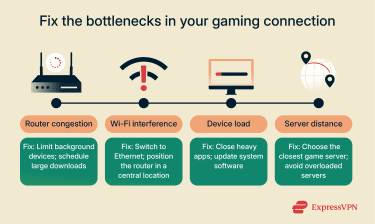
Tips to improve connection speed and reliability
If you experience lag or choppy streams, a few targeted adjustments can improve connection reliability. The tips below focus on stability to maintain consistent performance during periods of high network activity.
Use Ethernet whenever possible
A wired connection gives your console a direct path to the router, which helps keep your online gaming connection steady. You avoid the wireless interference that can cause lag or spikes in response time, and you usually get lower latency and more consistent speeds.
Using Wi-Fi is usually fine for casual gaming, but a wired setup is best for a consistent, competitive online experience. If you game on a mobile device at home and you’re close to your router, you can also use an Ethernet adapter to get similar benefits and improve your connection quality.
Close background apps and devices
Any device or app using your bandwidth can cause delays in your game. Streaming video, cloud backups, software updates, and smart home devices all affect both download and upload speeds. Reducing background activity helps your game maintain steady data flow with fewer spikes.
Prioritize gaming traffic with Quality of Service (QoS) settings
Many routers include QoS controls that let you prioritize your gaming device so it gets more consistent bandwidth during local network congestion. While QoS can’t reduce latency caused by your ISP or distant servers, it does help prevent lag when others in your home are streaming or downloading heavily.
Choose the closest game server
Distance plays a big role in how quickly your actions reach the game server. The farther away the server is, the longer your data has to travel, which increases your ping and can cause input delay or sudden lag spikes.
If the game supports a server browser or regional selection, such as North America or Europe, choosing a server physically closer to you usually reduces the number of hops your data must take to reach it. A hop is each point where your data is passed between routers on the path to the gaming server; fewer hops usually mean less processing time, which makes your gameplay feel faster and more responsive. Not every game offers this option, though; some titles will not let you pick a region or specific server.
Understanding your internet plan
Your internet plan affects more than your top speed. When you know how your plan works, you'll be able to identify its limitations.
Bandwidth vs. speed
ISPs often use speed and bandwidth interchangeably to describe how much data your connection can move in a given amount of time, but bandwidth and actual performance aren't the same. Bandwidth is the maximum capacity of your connection, while throughput (or actual speed) is the real amount of data that reaches your device.
When multiple people in your household are streaming, downloading, or gaming at the same time, they share the available bandwidth, which reduces throughput and can make your connection feel slower, even if your plan advertises high speeds.
Beware of data caps and throttling
Some providers place limits on how much data you can use each month. These limits are called data caps. When you reach the cap, your provider may lower your speed or charge extra fees.
Modern games, like Call of Duty: Black Ops 6, can use large amounts of data. Online play often uses 40–300 megabytes (MB) per hour, and game downloads can be well over 100 gigabytes (GB). Hitting a cap can happen faster than you'd expect.
Throttling is when your ISP slows specific types of traffic, and it can happen in different ways. Some providers use activity-based throttling, which targets particular types of traffic such as streaming or gaming data.
Others apply broader slowdowns during peak hours to manage congestion across the network. If any of these forms of throttling occur while you’re gaming, you might notice lag, delays, or slower downloads.
Can a virtual private network (VPN) improve your gaming experience?
A gaming-optimized VPN can improve performance in specific situations. It can’t prevent your ISP from enforcing data caps or slowdowns caused by network congestion, but it can help with some types of throttling. Because a VPN encrypts your traffic, your ISP can’t easily see what you’re doing online. This makes it harder for it to target specific activities, like gaming or streaming, if it typically throttles those categories.
A VPN also won’t fix high ping caused by distance or slow internet speeds, but it might reduce ping if your ISP’s route to the game server is inefficient. In those rare cases, a VPN can give you a smoother, more reliable gaming experience by creating a more stable path between you and the game server.
By hiding your real IP address, a VPN also keeps your connection private, helping protect you from distributed denial-of-service (DDoS) attacks that sometimes target competitive players.
Best VPN practices for gamers
If you want to game with a VPN, there are a few things you can do to keep your connection stable. The goal isn’t to boost your speed but to get the most consistent route between you and the game server. These steps help you avoid unnecessary delays while still protecting your traffic.
- Choose the nearest VPN location: Picking a server close to your actual location or close to the game server your title connects to usually gives you the lowest added latency. The shorter the distance, the quicker your traffic reaches the game server.
- Enable split tunneling for non-gaming apps: If your game doesn’t need the VPN but you want protection for other apps, split tunneling lets you send only specific traffic through the VPN. This reduces unnecessary load and avoids extra routing for the game itself.
- Stick with lightweight VPN protocols: Modern VPN protocols, such as ExpressVPN's Lightway, are designed to connect faster and remain stable even on changing networks. They help reduce the overhead that can affect gaming performance.
FAQ: Common questions about internet speed for gaming
What internet speed do I really need for gaming?
Gameplay itself typically requires less than 1 megabit per second (Mbps), but it’s better to aim for speeds between 25 and 50Mbps for faster downloads, patches, streaming, and in-game voice chat. Low latency and stability also matter for uninterrupted gaming. Competitive gamers should aim for a low ping of 10—20 milliseconds (ms), but a ping lower than 75ms is usually good enough for casual gaming.
Is 100Mbps good enough for online games and streaming?
100 megabits per second (Mbps) is helpful for fast downloads, streaming while gaming, and connecting multiple devices at once. Most games require only about 3–6Mbps download and 1–3Mbps upload for smooth play. While 1 Mbps might work for very basic gaming, more bandwidth helps prevent lag, especially if others are using the network or if you stream gameplay.
Is 300Mbps overkill or just right for gamers?
300 megabits per second (Mbps) is faster than the minimum required speed, even for competitive gamers. Competitive gameplay uses about 1Mbps in most titles. It's your latency that really impacts gaming performance.
Why am I still lagging even with fast internet?
Lag usually comes from latency, jitter, or unstable routing rather than speed. Delays can be caused by Wi-Fi interference, crowded networks, outdated hardware, and unoptimized or distant game servers. If you’re experiencing lag, some quick tips can help improve your connection and reduce it.
Should I use a VPN for gaming?
A gaming-optimized VPN can help in specific situations, especially if your provider slows certain types of traffic. Because a VPN encrypts your connection, your internet service provider (ISP) can’t see that you’re gaming and won’t throttle traffic based on your activity. A VPN also hides your IP address, which can help protect you from distributed denial-of-service (DDoS) attacks during competitive play.
How can I accurately test my internet speed for gaming?
For the best results, you should run a speed test under the same conditions as when you play. This way, it accounts for other factors that affect your connection, such as background apps running, other users on the network, and your connection type, so you know your actual speed. Tools like Ookla Speedtest or Cloudflare’s speed test typically give reliable results.
Does my internet service provider (ISP) throttle my gaming traffic or cap my data?
Some providers place data caps on monthly usage, and others slow certain types of traffic during busy hours. If gaming suddenly feels slower at the same time each day or only certain apps lag, throttling may be the cause. A VPN can't fix congestion-based slowdowns, but it can help alleviate category-based throttling or routing issues.
What internet plan features should gamers look for?
Fiber-optic internet is the best connection type because it offers the fastest speeds and the lowest latency. If that’s not available, a cable internet connection is the next best option. When selecting a plan, ensure it provides sufficient upload speed for voice chat, patch downloads, and online play, as well as a high download speed. It also helps to choose a plan with no data caps and a modem or router that supports modern Wi-Fi standards.
Take the first step to protect yourself online. Try ExpressVPN risk-free.
Get ExpressVPN