Token-based authentication explained: How it works, benefits, and best practices



Many modern apps let you refresh a page without having to re-enter your password, stay logged in across sessions, or use one account to access multiple services. This is made possible by token-based authentication. It allows services to verify users and systems without repeatedly handling credentials.
What is token-based authentication?
Token-based authentication is a security method where a server generates a digitally signed token after a user successfully logs in. That token is then used to verify identity for subsequent requests without requiring them to repeatedly send their credentials.
Instead of relying on a server-side session alone, the system relies on the token to carry information about the user and their permissions. As long as the token is valid and its signature can be verified, the server can treat the request as authenticated.
How token-based authentication works
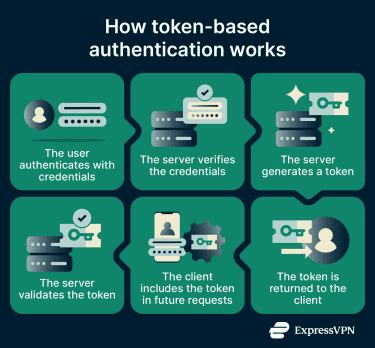
Token-based authentication follows a request–verification flow between the client and the server. The process generally works as follows:
- The user authenticates: A user submits their credentials, typically a username and password, to an authentication server.
- The server verifies the credentials: The server checks the credentials against stored records, such as a database or identity provider (IdP). If the credentials are valid, authentication succeeds.
- The server generates a token: After successful authentication, the server creates a token that contains claims about the user, such as user ID, permissions or role, and token expiration time.
- The token is returned to the client: The token is sent back to the client application, which may be a browser, mobile app, or API client. The client then stores the token, for example, in a request header.
- The client includes the token in future requests: For each subsequent request, the client sends the token along with the request.
- The server validates the token: When the server receives a request, it verifies the token and checks whether it has expired. If the token is valid, the server authenticates the embedded claims and processes the request accordingly.
Stateless verification
A key feature of token-based authentication is that the server doesn’t need to keep a record of who’s logged in (although in some cases it may still maintain some data). Instead, the server keeps the secret key in symmetric systems or the public key in asymmetric systems to verify that a token signature is genuine. If the signature checks out and the token hasn't expired, the request is authenticated.
What are the main types of authentication tokens?
There are two main types of authentication tokens and each serves a specific role in verifying identity and granting access to resources.
Access tokens
Access tokens are the type of token that the server issues once the user logs in. It contains claims about the user, such as their identity, role, and what they're permitted to do. Access tokens are also intentionally short-lived, typically expiring within minutes to a few hours.
Refresh tokens
Because access tokens expire quickly, users would be forced to log in repeatedly without a way to renew them silently. Refresh tokens solve this. When an access token expires, the client uses a refresh token to request a new one without any action from the user.
Refresh tokens are longer-lived, often valid for days or weeks, but unlike access tokens, they can be stateful, as the server often keeps a record of them. This means that even though a refresh token may also exist on the client side, the server can verify, track, and revoke it at any time. If a compromise is detected, security teams can invalidate a refresh token immediately, cutting off the session even if the associated access token has not yet expired.
Common token-based authentication methods
JSON Web Token (JWT) authentication
JSON Web Token (JWT) authentication is one of the most widely used approaches for modern web and API applications. Rather than storing session data on the server, the server issues a JWT that the client includes with every subsequent request.
A JWT is a compact, URL-safe string made up of three Base64-encoded parts separated by dots:
- Header: Specifies the token type and signing algorithm, such as HS256 (symmetric) or RS256 (asymmetric).
- Payload: Contains claims about the user, like their ID, role, expiration time, and any other attributes the server needs to make access decisions.
- Signature: A cryptographic hash of the header and payload, signed with a secret or private key. Because the payload is signed, any modification to the token, even changing a single character, invalidates the signature, and the server rejects it.
One important caveat is that the header and payload are encoded, not encrypted, so they can be decoded and read by anyone who holds the token. Sensitive data such as passwords or payment information should never be stored inside a JWT.
OAuth authorization
OAuth 2.0 is an industry-standard authorization framework that uses tokens to grant applications limited, scoped access to a user's data. Rather than sharing a password with a third-party app, a user authorizes the app to act on their behalf, and the authorization server issues an OAuth access token scoped to exactly what was permitted.
This is the mechanism behind "Log in with Google" or "Connect with GitHub" flows. The user authenticates with Google, Google issues a token granting the third-party app access to specific data (such as their email address), and the app uses that token without ever seeing the user's Google password.
What are the benefits of token-based authentication?
Token-based authentication improves how modern systems handle identity verification by reducing repeated transmission of credentials and enabling secure, scalable access across applications and services.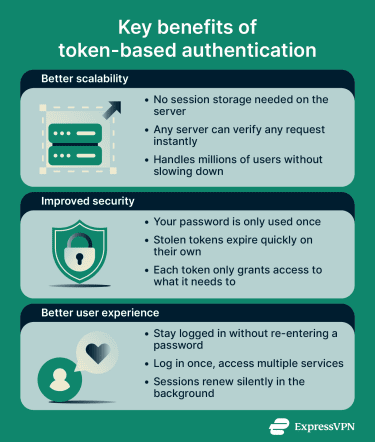
Better scalability for APIs and apps
Traditional session-based authentication relies on the server maintaining a session table of every active user session. Each request requires a database or cache lookup to retrieve the user's session data from that table. As applications grow, this may create a bottleneck or a single point of failure.
Token-based authentication reduces that dependency. Because the token carries the user's identity and permissions, servers in a distributed system can verify requests without coordinating with a central session store.
This is what makes it particularly useful for microservices, cloud-native architectures, and APIs that need to scale horizontally. Adding more servers requires fewer changes to session management, as each instance validates tokens independently using the same signing key.
Improved security
With short-lived access tokens, an attacker has a narrow window before they expire. Refresh token rotation can make stolen refresh tokens detectable: if both the attacker and the legitimate client attempt to use the same token, the server can flag and revoke the session.
Tokens also support fine-grained permissions. Rather than granting broad access, a token can be scoped to exactly what a user or service needs. This principle of least-privilege access reduces the impact of any single compromised credential.
Enhanced user experience
Tokens enable seamless single sign-on (SSO). A user authenticates once, and the resulting token can grant access to multiple related services, which is how logging into Google once provides access to Gmail, Google Drive, and YouTube without separate logins.
Refresh tokens make persistent sessions possible without sacrificing security. When an access token expires, the client silently requests a new one. The user never sees a login prompt, and the security mechanisms continue running in the background.
Where is token-based authentication used?
Token-based authentication is widely used across websites, apps, APIs, and enterprise systems in day-to-day operations. It's particularly useful in the following scenarios:
- For mobile and single-page applications (SPAs): Mobile apps and SPAs often need to maintain sessions across multiple servers and domains. Because tokens are often stateless and not tied to a specific server, they work seamlessly in these environments without requiring session storage or database lookups.
- For API authentication: APIs are often called thousands of times per second. Tokens provide a scalable, stateless way to authenticate requests without the security risks of passing credentials with every call.
- For SSO: Organizations using multiple applications can use token-based authentication to let users log in once and access all connected services without re-entering credentials each time.
- For microservices and distributed systems: When an application spans multiple services, tokens allow each service to independently verify requests using a signing key, without coordinating with a central session store.
How token-based authentication is implemented
In modern applications, token‑based authentication is commonly implemented using an authorization framework like OAuth 2.0, with JWTs serving as the digital tokens. OAuth 2.0 defines how tokens are issued and managed, while JWTs define how token data is structured, signed, and verified.
Typical implementation flow
- Set up an authorization server: Configure a server or use a third-party IdP (e.g., Auth0, Okta) to handle authentication, issue tokens, and validate them. Decide on a signing method (symmetric or asymmetric) for your tokens.
- Create a login endpoint: Build a secure endpoint where users submit their credentials. Validate them against your database or IdP and handle errors carefully to avoid leaking information.
- Generate signed tokens: After a successful login, generate a short-lived access token (usually a JWT). Optionally, generate a refresh token to allow the client to obtain new access tokens without requiring the user to log in again.
- Return tokens to the client: Send the access (and refresh) tokens in a secure JSON response.
Best practices for token-based authentication
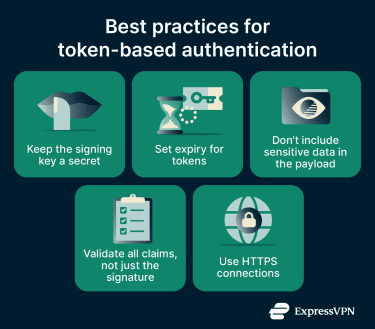
- Keep the signing key secret: The signing key should only be shared on a need-to-know basis, not broadly across teams.
- Set expiry for tokens: Tokens should not be valid indefinitely. Each token should be assigned an explicit expiry period, after which it is automatically invalidated.
- Don’t include sensitive data in the payload: Since the payload is encoded and not encrypted, only include the minimum necessary information required for functionality and security.
- Use HTTPS connections: Always send tokens over HTTPS connections, as unsecured connections can expose them to interception and compromise.
- Validate all claims, not just the signature: Always check expiration, issuer, and audience. A valid signature on a token intended for a different service should still be rejected.
Common pitfalls to avoid
- Misconfigured algorithm: Attackers can manipulate tokens if an insecure algorithm is used for signing. For example, systems should not accept tokens signed with “none” (no signature).
- Weak signing key: If the signing key is weak, it becomes vulnerable to brute-force attacks. Always use strong cryptographic keys.
- Token carrying too much information: Because tokens have size limits, including excessive data can make them larger and more complex, which may degrade performance.
- Token revocation: A stateless token remains valid until it expires, even if the user logs out or the account is compromised. To address this, implement token revocation strategies such as blacklisting and token rotation.
Understanding the broader token landscape
While many modern authentication systems rely on digital tokens, some organizations still use physical tokens as a way to verify identity. Physical tokens are tangible items issued to a user that prove they are authorized to access a system. Common examples include:
- Hardware key fobs that generate one-time codes for logging in.
- USB security keys that plug into a device to confirm identity.
- Smart cards used in corporate or government systems.
How physical tokens work
Physical tokens operate on the principle of possession: the user must physically have the token to authenticate. Often, they generate a one-time password (OTP) or act as a cryptographic key for the login process. Unlike digital tokens, which can be transmitted over networks, physical tokens rely on something the user carries.
Are physical tokens considered token-based authentication?
Technically, yes, but in a broader sense. The “token” in token-based authentication refers to a credential that proves identity. Digital and physical tokens both serve that purpose, but modern token-based authentication usually refers to digital tokens transmitted and verified over networks. Physical tokens are often considered part of two- or multi-factor authentication (2FA or MFA) rather than the standard digital token flow, especially in web and API contexts.
FAQ
What is the difference between basic authentication and token authentication?
What is the difference between JWT and token-based authentication?
When should I use token-based authentication?
Is token-based authentication more secure than session-based authentication?
In practice, implementation details matter more than the choice of method: how tokens are stored, whether HTTPS is enforced, and how aggressively sessions or tokens are rotated.
Can token-based authentication be used for single sign-on?
How long should an authentication token last?