What is a hacker? Types, risks, and how to stay safe


“Hacker” is one of the most misunderstood terms on the internet. In movies and headlines, hackers are often portrayed as mysterious criminals breaking into systems from dark rooms filled with glowing screens. But the reality is far more complex.
Not everyone who hacks has harmful intentions. Some hackers work to expose security weaknesses so companies can fix them before criminals exploit them. Others, however, use the same technical skills to steal data, disrupt services, or commit fraud.
What is a hacker?
A hacker is someone who explores, tests, or manipulates computer systems, networks, or digital devices. Hacking isn’t always illegal or harmful; some hackers work to strengthen security, while others exploit weaknesses for personal gain. Hackers often have deep knowledge of technology and can identify vulnerabilities that most people can’t see.
Why do people hack?
The term “hacker” covers a wide range of behaviors and skill levels, all of which help determine the motivations. Common examples include:
- Financial gain: Exploiting weaknesses to steal money, sell data, or commit fraud.
- Security testing: Identifying vulnerabilities in systems to improve protection.
- Political or social activism: Promoting a cause or exposing wrongdoing.
- Personal challenge or curiosity: Learning and testing technical skills, sometimes aiming to gain notoriety or respect for their hacking talents.
Types of hackers
Hackers are often categorized based on their goals and methods using black, white, and grey hats. These categories help distinguish between ethical security professionals and malicious actors.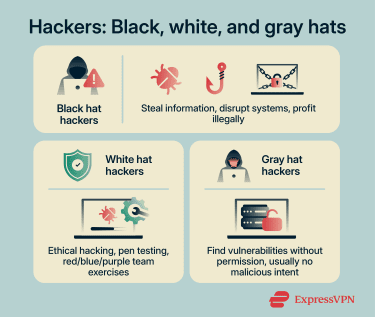
Black hat hackers
Black hat hackers are the ones most people think of when they hear the word “hacker.” They break into systems without permission to steal information, cause disruption, or profit illegally. Their activities are generally unethical and illegitimate.
These hackers often rely on tools such as malware, phishing, or ransomware to infiltrate systems and obtain valuable information. The data they target can include login credentials, email addresses, financial information, and other sensitive details that may later be sold or misused.
Because these attacks often target valuable personal and financial information, black hat activity can lead to identity theft, financial losses, and compromised systems.
White hat hackers
White hat hackers, also called ethical hackers, are security professionals who use hacking techniques to help protect systems rather than exploit them. Organizations may hire these professionals to conduct penetration testing (pen testing) to evaluate their defenses and uncover security flaws. Businesses, technology companies, and government agencies rely on this type of testing to detect vulnerabilities early and fix them before they can be exploited.
Many organizations also use hacking emulation exercises, like red, blue, and purple team drills. In these exercises, red teams simulate attacks, blue teams defend, and purple teams coordinate to improve security strategies. These exercises help businesses and government agencies strengthen their cybersecurity defenses.
White hat hackers typically use many of the same tools and methods as malicious hackers. The key difference is authorization and intent. Their work is conducted legally and focuses on strengthening security, improving protections, and reducing the risk of future cyberattacks.
Gray hat hackers
Gray hat hackers operate in a space between black hat and white hat hackers. They may discover and access system vulnerabilities without permission, but their goal usually isn’t to cause harm or make money.
Gray hat hackers typically expose security flaws to draw attention to them. For example, they might access a vulnerable system or publicly reveal a weakness so that organizations become aware of the problem and address it.
Unlike white hat hackers, however, they typically do this without prior authorization. As such, gray hat activities can still break the law. Publicly exposing vulnerabilities or accessing systems without permission can create unintended risks by alerting malicious actors to weaknesses before they’re fixed.
Other types of hackers
Not all hackers fit neatly into the categories of black hat, white hat, or gray hat. Some operate with different goals, motivations, or skill levels that set them apart.
Hacktivists
Hacktivists use hacking techniques to promote political or social causes. Instead of seeking financial profit, they typically target organizations, corporations, or government institutions to raise awareness about issues they care about.
Their actions are often designed to attract public attention and spark debate. To do this, hacktivists may deface websites, release sensitive information, or disrupt online services to make a statement about a particular cause or grievance. Hacktivists view their activities as a form of digital protest, but these actions can still violate laws and cause significant disruption.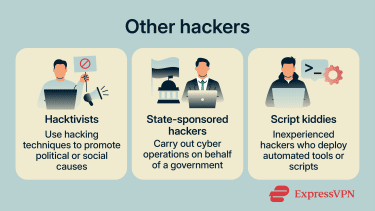
State-sponsored hackers
State-sponsored hackers are groups or individuals believed to conduct cyber operations with the backing or direction of a government. Unlike financially motivated cybercriminals, their activities are typically associated with strategic goals such as espionage or political influence.
They often target infrastructure or other critical systems. Another common objective is intellectual property theft. By stealing trade secrets or research data, state-backed hacking groups may help advance a country’s strategic, technological, or economic interests.
Script kiddies
Script kiddies are inexperienced individuals who use ready-made hacking tools created by more skilled attackers. They’re often motivated by curiosity or the desire to gain attention.
Because the tools they use are widely available online, even people with limited technical knowledge can attempt to target systems or websites. Although script kiddies typically lack advanced skills, they can still cause disruption. Automated tools may overwhelm poorly secured systems or interrupt network services, especially when basic security protections are missing.
How do hackers get into systems?
Black hat hackers typically gain access to systems by exploiting weaknesses in technology or human behavior. Vulnerabilities can include weak or reused passwords, unpatched software, or misconfigured systems. Common attack methods involve deceptive messages, malware, and other techniques that trick users or bypass security controls. Below are several of the most common ways hackers gain entry into systems and accounts.
Phishing and social engineering
Phishing campaigns and social engineering attacks manipulate people rather than technology. Instead of breaking into systems directly, attackers attempt to trick victims into revealing sensitive information or performing actions that grant access.
Phishing remains one of the most pervasive entry points for attackers. In a typical phishing attempt, the victim receives a message that appears to come from a trusted organization, such as a bank, delivery service, or employer.
Most of these messages rely on:
- Impersonation: Messages that appear to come from legitimate companies or individuals.
- Urgency: Warnings about account problems or security issues that pressure the victim to act quickly.
- Fake websites or forms: Links that lead to malicious pages designed to harvest login details or personal information.
Weak passwords and stolen credentials
Passwords remain one of the main ways accounts are protected. When they’re weak, reused across multiple services, or exposed in data breaches, attackers can easily exploit them. This is a serious concern: billions of password entries are currently circulating online from various leaks and breaches.
With so many credentials available for password cracking, attackers also rely on automated tools that can try thousands or even millions of password combinations. This allows them to quickly test commonly used or previously exposed login details. Once a password is matched, hackers often use credential stuffing, where leaked username and password pairs are tested across multiple sites to gain further access.
Malware and infected downloads
Cybercriminals deploy malware to gain access to systems through files or programs that appear legitimate. Victims may unknowingly install this software when downloading applications, opening email attachments, or installing unofficial updates. Malware can also spread through supply chain attacks, where attackers compromise legitimate software providers or widely used tools to distribute malicious code.
Some common types of malware include:
- Trojans: Programs disguised as legitimate software that secretly carry out malicious actions.
- Spyware: Software that monitors activity and collects sensitive information without the user’s knowledge.
- Keyloggers: Malware that records keystrokes and sends the data to an attacker.
- Worms: Self-replicating malware that spreads across networks without user interaction, often exploiting security vulnerabilities.
Unpatched software vulnerabilities and exposed services
Hackers often gain access to systems by exploiting software vulnerabilities, which are flaws in code that can allow them to bypass security controls or carry out malicious actions. These weaknesses may be discovered after software is released, and although developers issue patches to fix them, not all systems are updated in time.
In some cases, however, there’s no patch available. Hackers may discover previously unknown vulnerabilities (known as zero-day vulnerabilities) in software, including systems developed by the organization itself.
Attackers also actively scan for exposed services. They may target misconfigured systems such as open Remote Desktop Protocol (RDP) ports or public cloud storage databases.
Whether exploiting known or newly discovered vulnerabilities, attackers often use specialized tools or custom techniques to gain unauthorized access.
How to tell if a device or account has been hacked
A cyberattack isn’t always obvious. In many cases, attackers try to remain unnoticed so they can continue accessing systems or collecting information. However, hacked accounts or devices often show signs of malware or other indicators that something isn’t right.
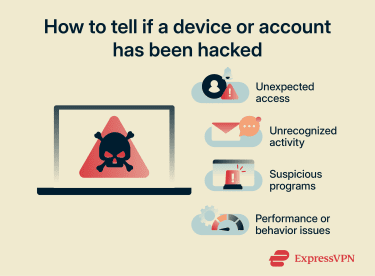
These signs don’t always guarantee a hack, and a hack doesn’t always guarantee these signs appearing, but indicators like these can suggest unauthorized access or malicious activity:
- Unexpected password changes: An account password no longer works even though it hasn’t been changed by the owner.
- Unknown login alerts: Security notifications show sign-ins from unfamiliar devices or locations.
- Unrecognized account activity: Messages, posts, or transactions appear that weren’t created by the account owner.
- New programs or apps appearing: Software shows up on a device even though it wasn’t installed intentionally.
- Device performance or behavior issues: Devices run unusually slow, crash frequently, or behave in ways that aren’t typical.
Another warning sign is when friends, coworkers, or contacts receive suspicious messages from an account. Attackers sometimes use compromised accounts to spread spam, phishing messages, or malicious links. In some cases, financial or service accounts may show unfamiliar charges or settings changes. These irregularities can signal that someone else has gained access, and the user will need to take action to address the situation.
How to protect yourself from hackers
Strong digital security doesn’t require advanced technical knowledge. In most cases, simple habits and built-in security tools can significantly reduce the risk of unauthorized access. The sections below outline several effective ways to reduce the risk of malicious hacking and protect personal information.
Use strong, unique passwords
Passwords remain one of the most important defenses for online accounts. A weak password can often be guessed quickly by automated tools, especially if it contains common words, short patterns, or predictable number sequences.
Strong passwords are primarily long and unique. If you need a memorable one, use a random passphrase; otherwise, use a password manager like ExpressKeys, as this makes it far easier to create and securely store and use long, random passwords.
Turn on multi-factor authentication
Multi-factor authentication (MFA) adds an extra layer of security beyond a password. Instead of relying on a single login step, MFA requires one or more additional verification methods before access is granted.
This second factor can include something the account owner has, such as a hardware security key, a smartphone app that generates a temporary code, or a one-time SMS code. It can also be something that verifies the owner’s identity, such as a fingerprint or facial scan. Even if a password becomes exposed, the attacker still needs the additional verification step to gain access.
When setting up MFA, it’s best to use phishing-resistant MFA such as hardware security keys or passkeys, which are designed to prevent attackers from capturing or reusing authentication data.
Keep software and devices updated
Software updates often include security patches that fix newly discovered vulnerabilities. When devices or applications remain outdated, attackers may exploit known flaws that developers have already corrected in newer versions.
Operating systems, browsers, mobile apps, and even home devices like routers regularly receive updates that improve security, and many modern systems offer automatic updates. Enabling this feature ensures that security fixes are installed as soon as they’re available, reducing the time during which systems remain exposed.
Avoid suspicious links and attachments
Malicious links and attachments are commonly used to distribute harmful software or redirect victims to fake websites. These messages often appear to come from legitimate organizations, which makes them hard to recognize at first glance.
Suspicious messages may appear in email, text messages, social media platforms, or messaging apps. Attackers frequently rely on urgency or curiosity to encourage quick clicks before the recipient has time to verify the message.
Warning signs may include unusual sender addresses, unexpected attachments, or messages requesting sensitive information. Verifying the source before opening links or files helps reduce the risk.
Back up important files
Data backups provide a safety net if files are lost, damaged, or locked by malicious software. A backup is simply a copy of important data stored in a separate location so it can be restored later if necessary.
Backups can be stored in several ways, including external storage devices or secure cloud storage services. For stronger protection, many security experts recommend keeping multiple backups in different locations. This ensures that important files remain accessible even if one backup source becomes unavailable.
Use a VPN
A virtual private network (VPN) adds a layer of privacy and security when using the internet. It encrypts the connection between a device and the VPN server, making it harder for attackers or eavesdroppers to intercept data, especially on public Wi-Fi networks.
However, a VPN alone can’t stop phishing attacks, malware, or hackers gaining access through stolen or weak passwords. It also won’t protect against vulnerabilities in your apps or devices. That said, some VPNs come with additional tools: ExpressVPN’s Threat Manager helps block trackers and known phishing sites, and the ExpressKeys password manager can generate and store strong passwords for all your accounts.
Use security tools
Security tools such as antivirus software can detect and remove malware before it causes damage, while firewalls help block unauthorized access to devices or networks.
Other tools and settings, like app permission controls, can limit how apps access sensitive data, and system-level security settings can prevent unnecessary exposure. Combined with strong passwords, MFA, and a VPN, these tools create multiple layers of protection against common attacks.
What to do after a hack
Discovering that an account or device has been hacked is stressful, but acting quickly can reduce the damage and help restore control. The most important steps focus on securing affected accounts, protecting personal information, and preventing further access. If a breach is suspected, here’s how to limit the impact:
- Log out of active sessions: Sign out of all devices and remove any unknown or unfamiliar devices from your accounts to prevent further unauthorized access.
- Change compromised passwords immediately: Update passwords for affected accounts and any other accounts that may use the same password. Choose strong, unique passwords to prevent further access.
- Enable MFA: If it isn’t already active, turning on MFA adds an extra layer of protection that makes it much harder for attackers to access accounts again.
- Monitor account activity: Check login history, recent transactions, and settings for anything unfamiliar, and continue watching for unexpected logins or changes in the weeks following the incident.
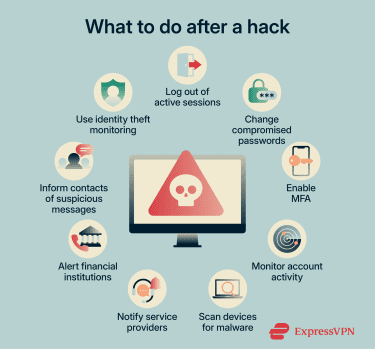
- Scan devices for malware: Use trusted security software to check computers and mobile devices for malicious programs that may have allowed unauthorized access.
- Alert financial institutions if necessary: If banking or payment information may have been exposed, contacting your bank or card provider quickly can help prevent fraudulent transactions.
- Inform contacts about suspicious messages: If attackers gained access to email or social media accounts, they may have sent phishing messages to others. Warning contacts can help prevent additional people from falling victim.
- Consider identity theft monitoring: If sensitive personal information may have been exposed, services like ExpressVPN’s Identity Defender, available to U.S. users on the Advanced and Pro plans, can offer real-time alerts highlighting suspicious activity.
FAQ: Common questions about hackers
Is hacking always illegal?
Are all hackers bad?
What is the difference between a hacker and a cybercriminal?
What’s the difference between a hacker and a security researcher?
Can hackers access phones and smart devices?
Take the first step to protect yourself online. Try ExpressVPN risk-free.
Get ExpressVPN