How to use AI in your daily life (turn AI into your personal assistant)



AI is a valuable tool that can help draft emails, plan trips, debug code, and support complex projects. A well-prompted AI can remove significant friction from tasks that used to take much longer, and the key is knowing what model to reach for and how to prompt the AI effectively.
This guide covers the most practical ways to use AI in your daily life, from learning and planning to writing and problem-solving. It also highlights a few key considerations to keep in mind so you can use AI effectively and responsibly.
Everyday use cases
From learning something new to tackling a complex project, the use cases below cover the most practical ways to put AI to work in your daily life.
Learning new things
AI can be a useful starting point when you're trying to learn something new. It can help you quickly grasp unfamiliar ideas, explain terminology, and show you which parts of a topic matter most. That can make it easier to get oriented, especially when you're facing a subject that feels dense or technical.
At the same time, AI has some limits as a learning tool. Its explanations can be incomplete or simplified, especially in niche or complex areas. This is particularly important when you're learning a subject from scratch: without enough background knowledge, it can be hard to spot gaps or inaccuracies.
Getting up to speed on unfamiliar topics
You can ask what a term means, how a concept works, or why something matters, and then keep refining the explanation through follow-up questions. For example, you might ask for a simpler version, a more technical version, a real-world example, or a comparison to something you already understand. This back-and-forth can make unfamiliar material feel much more approachable.
For open-ended explanation and general knowledge support, GPT OSS 120B, available with ExpressAI, is a strong option. It performs well across a wide range of topics and can be especially helpful when you want summaries, definitions, or broad overviews.
For important topics, it's worth checking key ideas against reliable sources, especially before relying on them in school, work, or decision-making.
Learning a new skill
AI can also be helpful when you're actively practicing a skill, not just reading about one. If you’re learning a language, trying to understand how to use a new piece of software, or picking up a skill like basic investing or home repair, you can ask for step-by-step guidance or even practice exercises. You can also ask the AI model to correct your work, requesting guidance on what could be improved or fixed. This iterative feedback is valuable in building skills.
AI feedback can suggest useful next steps, point out mistakes, and help you keep moving, though it may sometimes miss important context or give more general advice. It works best alongside reliable instruction and real-world practice.
Planning and organizing
AI handles constraint-based planning well. If you give it all the relevant details, it can generate structured options that you can work with.
Planning things like meals or trips
For meal planning, AI can generate weekly menus based on your grocery list or what’s typically in your fridge, while also accounting for factors like dietary preferences and how much time you have each day for cooking.
For travel, AI can be especially useful when you want help turning general ideas into a practical plan. It can suggest itineraries, flag what to consider when visiting a specific place, and help you compare destinations based on your priorities. It can also make recommendations much more specific to your situation. For example, if you’re traveling with a toddler, you can ask for toddler-friendly sights, activities, parks, playgrounds, museums with hands-on exhibits, etc. Instead of giving you a generic list of top attractions, it can help narrow things down to places that actually fit your needs.
Managing your calendar and to-do lists
AI can take a disorganized list of tasks and give it structure. If you simply dump everything you need to do over a certain period of time, highlight details like which tasks are time-critical and which ones are flexible, and ask it to help you prioritize, it’ll provide a structured to-do list to give you a sense of direction on tackling your tasks.
This logic applies to project planning as well. If you have a large project to work on but can’t seem to figure out a starting point, you can give it details of the project, the key deliverables, and when it’s due. It will then process this information and break the project into multiple subtasks that can be tackled one by one, while also providing estimates of how long each subtask should take to deliver the project within the deadline.
DeepSeek R1 Distill 32B, for example, is a good model choice for multi-step reasoning and structured tasks like the above, given its ability to reason and think about a task in depth before providing an output.
Writing and communication
Writing and editing are among the most common uses for AI and also some of the most immediately useful for people at any level of experience.
Drafting and editing emails, or writing other content
AI can help you draft an email from just a few bullet points, proofread text you’ve already written, or adjust the tone of a message that isn’t landing right. For example, if you’ve drafted a formal email but are struggling to capture the tone, running it through an AI model and asking it to rework the email with a more official tone will provide you with some wording more closely suited to your purpose.
If you’re ever uncertain about a particular output, it’s worth running the same prompt through multiple models using ExpressAI's side-by-side comparison feature. Different models produce meaningfully different outputs, and comparing them takes seconds, so it’s a quick way to get the optimal result without starting from scratch.
Summarizing things you don't have time to read
Long documents take time to read and process, and not everything warrants a full read-through. Whether it is a lengthy blog post, a research paper, a dense report, or an extended email thread, you can paste the text into AI and ask for a summary, the key decisions, action points, or the main arguments.
ExpressAI takes this concept further with secure file uploads and image analysis. Rather than copying and pasting, you can upload files of up to 50MB directly. If you have a scanned file or a chart you need explained, the Qwen2.5-VL 32B model within ExpressAI can read and interpret it directly without you typing or pasting anything.
Translations
AI handles translation well for everyday purposes. It can translate text and explain idiomatic phrases that don’t translate literally, as well as helping you to draft messages in another language and checking that they read naturally. For multilingual tasks, the Qwen3.5 35B-A3B model, also available on the ExpressAI platform, supports over 200 languages and is well-suited to this kind of work.
Ideation and problem-solving
If you have a problem to solve and aren’t sure where to start, AI can provide a sense of direction to help you get started.
Brainstorming and generating ideas
One of the most effective ways of using AI is simple brainstorming and generating a variety of ideas quickly. For instance, if you have a presentation to make and aren’t sure what approach to take, simply giving the AI the topic of your presentation and asking it for ideas will get you several angles to consider.
To help hone in on your desired output even more, you can tell the AI to ask you clarifying questions before it starts generating ideas, thus helping fine-tune the output.
Creative tasks
AI can help drive creativity when you’re having trouble getting started. If you’re brainstorming a name for a brand, for example, you can give AI the general idea behind that brand, and it will provide various potential names. You can also follow up to ask for more details, like what the logo and general branding should be like.
Remember that the output is a starting point in most of these cases, and it won’t be perfect, but the value is having something concrete to build on rather than getting stuck looking at a blank page.
Troubleshooting and DIY
AI is useful when you have a practical problem and aren’t sure where to start. You can describe the issue, whether it is a misbehaving appliance or an error message on your laptop, and ask what could be causing it and what to check first.
Most AI chatbots will not only suggest possible causes but also explain how to check whether each one is actually responsible for the issue you’re seeing. Even if the chatbot doesn’t help you fully solve the problem, this can still help you quickly rule out common causes and narrow down your search in a more structured way.
Technical tasks
AI can assist with coding and data work that would otherwise require specialist experience or significant time spent reviewing documentation. As with any external tool, it’s important to be mindful of the information you share, especially when working with sensitive or confidential data.
Writing and debugging code
AI is a capable coding assistant for many common tasks. It can write functions from a description, explain what a piece of code does, find bugs, and suggest fixes. You don’t need to be a software developer to use this functionality, though you do need to ensure any outputs that are going to be used in production-level environments are thoroughly tested and verified.
Of the various models available in ExpressAI, NVIDIA’s Nemotron 12B and Qwen3.5 35B-A3B are both particularly effective at generating code and debugging.
Working with data and spreadsheets
Large spreadsheets and datasets can feel overwhelming, but AI is great at making sense of these and discerning patterns. Qwen2.5-VL 32B is particularly effective for this, as you can simply paste the data you have or attach entire spreadsheet files. It will then analyze all the data and highlight any trends it spots, and you can even query it further about any specific things you’re looking for.
How ExpressAI keeps your inputs private
ExpressAI is built around a different architecture from most public AI tools. Rather than processing conversations on standard servers, it uses confidential computing enclaves, which are cryptographically isolated environments where data is decrypted and processed in a sealed system.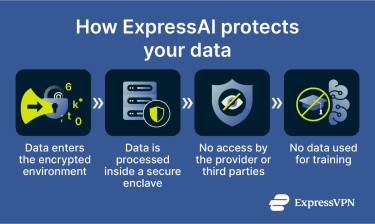
The platform operates on the core principles of zero training and zero access. Your conversations, prompts, and uploaded files are never used to train AI models. Neither ExpressVPN nor the underlying model providers can view or access what you send. ExpressAI also supports secure file uploads of up to 50MB, and these files are protected under the same encryption as your chat history.
The ExpressAI architecture has been independently audited by cybersecurity firm Cure53. The audit covered penetration testing, source code review, cryptography, key management, and infrastructure security, and all identified vulnerabilities were addressed before the product was launched.
FAQ: Common questions about using AI day to day
Is it safe to use AI for personal questions?
Can I upload work documents to an AI tool?
How is ExpressAI different from other public AI tools?
Will my prompts be used to train AI models?
Take the first step to protect yourself online. Try ExpressVPN risk-free.
Get ExpressVPN