 Celebrate with up to 80% off
IDS vs. IPS: Choosing the right defense for modern threats



Intrusion detection system (IDS) and intrusion prevention system (IPS) tools both help spot suspicious network, host, or system activity, but they respond differently. An IDS monitors activity and alerts teams so they can investigate, while an IPS can also actively block or limit traffic that matches prevention rules.
What is an intrusion detection system?
An IDS helps automate threat detection by monitoring network or system activity and alerting security teams when something looks suspicious.
How IDS detects suspicious activity
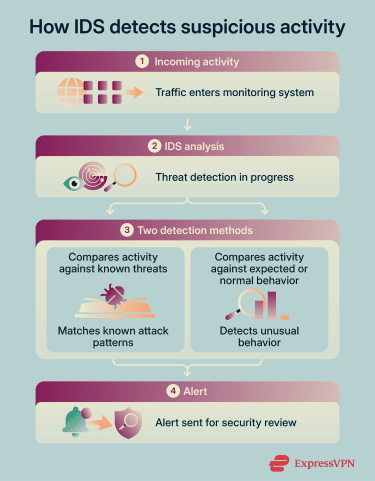
An IDS checks network traffic against threat signatures, security rules, and unusual behavior patterns. It can flag activity such as repeated failed logins or traffic from known malicious sources and then send alerts for review.
IDS solutions typically use two detection methods to monitor network activity:
- Signature-based detection: Checks activity against known attack patterns. This works well for recognized threats but can miss attacks that don’t match an existing signature.
- Anomaly-based detection: Builds a baseline for normal activity, like typical bandwidth use or open ports, then flags activity that falls outside that baseline. This can help flag unknown or unusual threats, including activity that doesn’t match a known signature. However, it can also create false positives when non-malicious but uncommon behavior falls outside the baseline.
 Common IDS deployment types include:
- Network intrusion detection system (NIDS): Monitors traffic moving through key points in a network and alerts teams to suspicious activity.
- Host intrusion detection system (HIDS): Installed on individual devices; monitors host-level activity like system logs, file integrity changes, configuration or registry modifications, running processes, login activity, and user behavior. It can help identify signs of malware infection, unauthorized access, or suspicious activity on the device.
- Wireless intrusion detection system (WIDS): Monitors wireless networks for unauthorized access points, rogue devices, misconfigured wireless equipment, and suspicious activity targeting Wi-Fi infrastructure.
- Virtual machine-based intrusion detection system (VMIDS): Monitors and detects suspicious behaviors targeting virtual machines.
- Stack-based intrusion detection system (SBIDS): Integrates IDS security into an organization’s Transmission Control Protocol / Internet Protocol (TCP/IP) stack to monitor and analyze packet transmission through an internal network.
Strengths and limitations of IDS
IDS has some clear advantages, including that it:
- Detects suspicious activity early: An IDS monitors traffic, devices, or system activity for known malicious behavior or suspicious patterns and alerts teams immediately.
- Supports incident response: IDS alerts and logs can help teams investigate events, refine detection rules, and send data to security information and event management (SIEM) systems to support investigation and response.
- Adds visibility without disrupting traffic: A network IDS often analyzes copied traffic, so it generally doesn’t sit directly in the traffic path.
- Can detect unusual behavior: Anomaly-based IDS tools can flag activity that falls outside normal patterns, which may help teams spot unknown threats.
The limitations of IDS include that it:
- Doesn’t stop threats by itself: An IDS sends alerts, but it doesn’t block malicious traffic unless paired with an IPS or another response tool.
- Needs active monitoring and updates: Alerts only help when security teams review them and respond quickly. IDS also needs regular tuning and updates for detection rules, signatures, and alert settings.
- Can miss unknown or hidden threats: Signature-based IDS tools rely on known attack patterns, so brand new attacks can evade detection.
- Can generate false positives: Unusual but harmless behavior can trigger alerts, especially with anomaly-based detection.
- Struggles with encrypted traffic: IDS tools may not inspect encrypted content unless the organization enables decryption or Transport Layer Security (TLS) inspection.
What is an intrusion prevention system?
IPS adds one key capability to IDS-style detection: it can also block or limit suspicious activity.
How IPS blocks suspicious traffic
An IPS is typically integrated inside the network perimeter (unlike an IDS), so traffic passes through it before reaching protected systems. Some IPS tools use deep packet inspection to examine packet details more closely, though encryption can limit what the tool can read.
If an IPS detects suspicious activity, it can use automated response rules to perform certain actions without waiting for human oversight. This can include dropping malicious packets, resetting connections, and blocking the source IP of malicious traffic.
IPS uses most of the same techniques employed by IDS solutions, including signature-based and anomaly-based detection. Some IPS solutions also use policy-based detection, where the system assesses traffic based on rules created by the organization’s security team.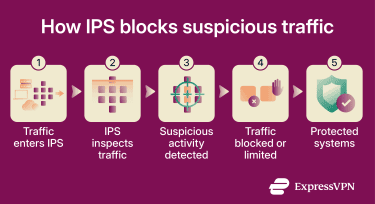
IPS tools fall into different categories based on where they’re deployed and what activity they monitor. These include:
- Network-based intrusion prevention system (NIPS): Monitors key network locations for cybersecurity threats and suspicious activities, automatically blocking or filtering malicious traffic before it reaches protected systems.
- Wireless intrusion prevention system (WIPS): Monitors wireless network activity and can help block or contain unauthorized devices.
- Host-based intrusion prevention system (HIPS): Monitors host-level activity and can automatically block malicious behavior, preventing unauthorized file or registry changes, stopping suspicious processes, blocking exploit attempts, or enforcing security policies directly on the device.
- Cloud-based IPS: Monitors traffic, workloads, and services in cloud or hybrid environments. These tools are designed to scale with cloud infrastructure and often integrate with cloud-native logging, identity, and security controls, while automatically detecting and blocking threats across distributed cloud resources.
Depending on its rules and capacity, an IPS can help detect or block traffic linked to attacks like:
- Known exploit attempts: Attacks where cybercriminals try to take advantage of known software vulnerabilities or security weaknesses to gain unauthorized access, run malicious code, steal data, or disrupt systems.
- Unauthorized access attempts: Suspicious login activity, brute-force attacks, or policy violations.
- Port scanning: A reconnaissance technique that checks a device or server for open ports. Attackers use it to find exposed services, weak points, or security tools before attempting an attack. Security teams also use port scanning to find and close unnecessary open ports.
- Malicious payloads: Files or scripts designed to deliver malware, exploit vulnerabilities, or execute harmful commands on a target system.
Strengths and limitations of IPS
An IPS has several core strengths, including that it:
- Can automatically block suspicious traffic: Drops packets or ends risky connections when traffic matches prevention rules.
- Works inline: Inspects traffic before it reaches protected systems.
- Uses multiple detection methods: Combines virus signatures, anomaly detection, and behavior and network traffic analysis.
- Supports different deployment types: IPS can run on networks, wireless networks, or individual hosts.
Its limitations include that it:
- Can block safe traffic: False positives can disrupt legitimate apps, websites, or tools.
- Can affect performance: Inline inspection may slow traffic if the IPS isn’t tuned well.
- Can struggle under heavy load: Some IPS tools may inspect less traffic or add latency when traffic volume exceeds capacity.
- Needs careful tuning: Rules need regular updates to stay accurate and reduce false positives.
- Can’t fully inspect encrypted traffic: Without decryption or TLS inspection, IPS tools have limited visibility into encrypted traffic and may only be able to analyze metadata such as IP addresses, domains, ports, packet sizes, and traffic patterns rather than the encrypted payload itself.
IDS vs. IPS: How they compare
IDS and IPS both monitor traffic and system activity for signs of malicious behavior, but they differ in how they respond to threats. IDS focuses on detection and alerting, while IPS adds automated prevention by blocking or limiting suspicious traffic before it reaches protected systems.
| Feature | IDS | IPS |
| Primary role | Detecting threats | Detecting and blocking threats |
| Deployment | Passive | Inline |
| Response | Alerts teams | Takes automated action |
| Traffic impact | No interruption | Can block or drop traffic |
| Operations risk | Lower | Higher |
| False positives | Extra alerts | Potential disruption |
| Performance impact | Minimal | May add latency |
| Best for | Visibility and investigation | Active threat prevention |
Do you need both IDS and IPS?
In most full security setups, you don’t need to choose between IDS and IPS solutions. Many organizations use IDS and IPS together as part of a layered security strategy: IDS adds visibility for monitoring and investigation, and IPS helps stop higher-confidence threats automatically.
While IDS and IPS are often used together, they serve different security purposes, so the right balance depends on whether an organization prioritizes visibility and alerting, active threat prevention, or a combination of both. Some security platforms, such as unified threat management systems, combine firewall, IDS, and IPS capabilities into a single system, while others deploy them separately.
When should you use IDS?
IDS works well when the goal is to detect suspicious behavior without directly impacting traffic; for example, for investigation or compliance monitoring. This is because it’s typically deployed passively, using mirrored or copied network traffic rather than sitting inline in the communication path between systems.
IDS is commonly used to monitor network boundaries, internal segments, endpoints, and wireless networks. It generates logs and alerts that help security teams investigate suspicious activity, identify potential threats, and support incident response.
When IDS may not be enough
IDS may not be enough when suspicious traffic needs an immediate response. It can alert on suspicious activity, but it doesn’t stop malicious traffic by itself. That means alerts need timely review and response from a security team or another security tool. For high-risk environments, IDS often works better alongside IPS, firewalls, endpoint protection, and SIEM tools.
When should you use IPS?
IPS fits environments where suspicious traffic needs fast, automated mitigation. It works best when teams need the system to block traffic that matches known attack patterns before manual review.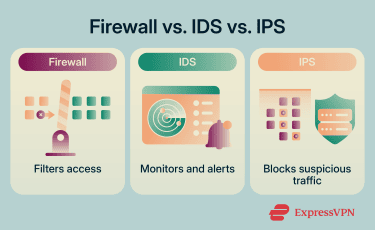
IPS works well at network boundaries, in front of critical segments, or anywhere traffic should be inspected before it reaches protected systems. It can help block known exploit attempts or traffic that violates security policies.
IPS also suits environments with clear blocking rules and enough monitoring to review false positives quickly.
When IPS may create challenges
IPS can create problems when false positives block legitimate traffic. Because it usually sits inline, poor configuration or heavy traffic loads can also affect performance, add latency, or disrupt access to apps and services.
IPS makes most sense when teams have the resources to test rules, monitor alerts, review blocked traffic, and adjust policies as network behavior changes.
How IDS and IPS work together
IDS and IPS can be deployed as complementary layers instead of alternatives. The balance between prevention and visibility is key: IPS handles high-confidence threats, like known attack signatures or clearly malicious traffic, while an IDS monitors broader activity and flags suspicious behavior.
Alerts from IDS are often sent to security monitoring tools such as SIEM platforms, where they can be correlated with logs from IPS, firewalls, and endpoints. This can help security teams validate incidents, reduce false positives, and refine detection and blocking rules.
IDS findings may also be used to improve IPS configurations. For example, repeated IDS alerts for a specific type of traffic may lead to new IPS rules, while IPS logs can help confirm whether threats were successfully blocked.
IDS vs. IPS vs. firewall: How they compare
IDS, IPS, and firewalls all help manage network traffic and reduce security risks, but they focus on different types of security control. A firewall primarily filters traffic based on predefined security rules to control what traffic can enter or leave a network. IDS and IPS tools go further by analyzing traffic and system activity for signs of suspicious or malicious behavior that may indicate an attack.
Similarities
Firewalls, IDS, and IPS can all support a layered security strategy by monitoring and controlling network traffic at different stages. Security teams configure each tool with rules or policies that determine what traffic to allow, inspect, flag, or block.
Alerts and logs from firewalls, IDS, and IPS are often integrated into broader monitoring workflows, including SIEM platforms and incident response processes.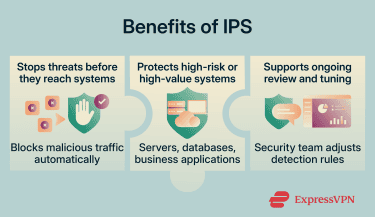
Differences
Firewalls filter traffic based on access rules. Teams place them inline at network boundaries or between trusted and untrusted networks, where they can allow, block, or filter traffic before it reaches protected systems. For a deeper look at traffic filtering and firewall rules, see our guide on how firewalls work.
IDS monitors selected traffic and alerts security teams when it detects suspicious patterns. Teams usually deploy IDS alongside the network traffic flow rather than directly inline, so it adds visibility without sitting directly in the traffic path.
An IPS usually sits inline with network traffic and can block, drop, or limit suspicious traffic before it reaches protected systems. Because IPS actively changes traffic flow, false positives create higher operational risk. They can interrupt legitimate traffic or add latency during heavy traffic loads.
When should you use a firewall?
Use a firewall when you need to control which traffic can enter, leave, or move between networks, devices, and applications.
Firewalls work well as an early control point for unwanted traffic. They help teams apply access rules between trusted and untrusted networks, segment internal systems, and reduce exposure before traffic reaches protected assets.
It’s important to note that modern security tools can blur the distinction between firewalls, IDS, and IPS. Next-generation firewalls often combine traditional firewall functions with deeper traffic inspection, intrusion prevention, and threat intelligence features.
IDS and IPS best practices
Below are best practices that can help teams keep IDS and IPS tools accurate and useful over time.
Tune rules to reduce false positives
IDS and IPS tools can flag normal activity as suspicious, especially after first deployment or major network changes. Security teams should review repeated alerts, adjust thresholds, and use allowlists or blocklists to reduce repeated false positives without weakening security.
For IPS, tuning matters even more because false positives can block legitimate traffic. A staged rollout helps teams test rules before applying them broadly.
It’s also a good idea to test new IPS blocking rules in detection-only mode before enabling them. This helps validate rule behavior and avoid disrupting legitimate services.
Monitor alerts and response actions
Alerts should lead to clear review steps, not sit unused in a dashboard. Teams should check what triggered each alert, which system it affected, and whether the event needs mitigation or rule changes (if the report is a false positive).
For IPS, blocked traffic also needs to be reviewed. Teams need to check whether the tool blocked malicious traffic or disrupted a legitimate service.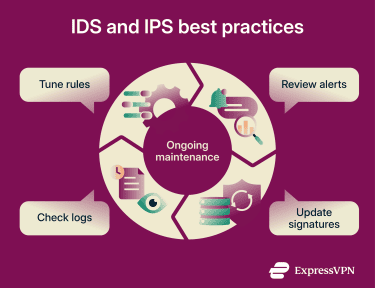
Keep signatures and policies updated
IDS and IPS tools rely on current signatures, detection rules, and policies to detect known attack patterns and apply configured responses. Updates should reflect new vulnerabilities, malware, attack patterns, infrastructure changes, and internal security policies.
Teams should test major updates before broad deployment whenever possible. Misconfigured signatures or overly broad policies can lead to false positives or disrupt regular traffic.
Review logs for emerging threats
Reviewing IDS and IPS logs can support cyber threat hunting by helping teams investigate suspicious patterns that alerts may not fully explain.
Consider repeated probes, scans, or suspicious connection attempts that may look minor in isolation. One or two alerts might not reveal the true scope of the threat, but reviewing logs over time can help teams identify patterns, assess severity, and determine whether similar activity is appearing elsewhere in the environment.
IDS and IPS logs become more useful when integrated with SIEM and Security Operations Center (SOC) workflows. Correlating IDS/IPS alerts with firewall logs, endpoint activity, and authentication events gives analysts a broader context and helps them prioritize high-confidence alerts while suppressing repetitive low-risk noise.
Logs can also support incident response by showing when suspicious behavior began, which system saw it first, and whether similar activity appeared across other network segments. For better visibility, IDS and IPS sensors should be deployed at key network choke points and between high-value segments.
FAQ
Is IDS or IPS better for small businesses?
Can IDS or IPS inspect encrypted traffic?
What happens if an IPS blocks safe traffic?
How often should IDS and IPS rules be updated?
Is cloud IPS different from network IPS?