 Celebrate with up to 80% off
Is Gmail secure? How safe is Gmail really in 2026


Gmail provides strong email security for everyday users. It includes controls such as spam, phishing, and malware filtering; Transport Layer Security (TLS)-protected connections; encrypted storage; and support for two-factor authentication (2FA).
However, consumer Gmail and standard Google Workspace don't provide end-to-end encryption (E2EE). Google also collects various types of user and service usage data, raising privacy concerns beyond email security itself.
Built-in Gmail security features
Below, we examine Gmail's main security features and how they protect email and account data.
Encryption
According to Google's documentation, Gmail encrypts email content and attachments while they are stored in its data centers and in transit, and uses TLS when communicating with other email providers. Encryption transforms data into a form that cannot normally be read without the appropriate key, while TLS helps protect messages against interception and alteration in transit.
TLS between email providers depends on both services supporting it and being correctly configured. If the receiving service doesn't support TLS, an outgoing message may be transmitted without TLS unless an organization has configured Google Workspace to require a secure connection.
Some work and school accounts using supported Google Workspace can also use Secure/Multipurpose Internet Mail Extensions (S/MIME). S/MIME can encrypt email and add digital signatures that authenticate the certificate used to sign a message and help reveal whether the message was altered. Its reliability depends on how the certificate was issued, managed, and validated.
Google Workspace supports different encryption configurations:
- Hosted S/MIME: Google manages a copy of the user's encryption key and performs S/MIME processing through Gmail.
- Client-side encryption (CSE): Encryption occurs in the user's browser before data is sent to Google. The organization controls the keys through an external key service or supported hardware keys.
Consumer Gmail and standard Google Workspace messages without additional encryption are not end-to-end encrypted. Hosted S/MIME also differs from strict E2EE because Gmail performs the cryptographic processing and Google manages a copy of the key. In its CSE documentation, Google describes its E2EE configuration for eligible Workspace organizations as preventing Google's servers from accessing unencrypted message content.
Two-factor authentication (2FA)
Its 2-step verification documentation states that Google Accounts support 2FA, which adds another authentication step when a password is used. Available methods can include Google prompts, authenticator codes, SMS or voice codes, and hardware security keys. Google Accounts also support passkeys, which can replace passwords and eliminate the second step.
These methods reduce the likelihood that a stolen password alone will provide access to an account. However, they don't prevent every form of compromise, such as the theft of an authenticated session or abuse of an account-recovery method.
Spam and phishing protection
Google states in its Gmail Product Protections page that Gmail uses AI-assisted filtering, sender and message signals, email authentication, and user feedback to identify suspicious emails. Google states these systems block more than 99.9% of spam, phishing attempts, and known malware. Gmail may display a warning, block a dangerous action, reject a message, or move it to the spam folder.
According to Google's email sender guidelines, senders delivering mail to personal Gmail accounts must meet requirements for TLS, Domain Name System (DNS) configuration, email formatting, and Sender Policy Framework (SPF) or DomainKeys Identified Mail (DKIM) authentication. Additional requirements, including Domain-based Message Authentication, Reporting, and Conformance (DMARC) and one-click unsubscribe for applicable messages, apply to bulk senders.
Google Security Checkup
Google Security Checkup helps you review and improve the security of your Google account. It guides you through important security settings, such as account recovery options that Google may use to contact you if it notices suspicious activity. It also alerts you to potential issues, such as inactive devices (devices that are still signed into your account but may no longer be in use) and unfamiliar sign-ins.
Gmail confidential mode
According to Google, confidential mode lets the sender:
- Set an expiration date for a message.
- Revoke access to a message at any time.
- Require an SMS passcode to open a message.
It also tries to prevent the recipient from copying, downloading, printing, or forwarding the message. However, it's important to understand that it's more of a deterrent than a guarantee. A recipient may still be able to take screenshots of the message or use third-party apps to circumvent these restrictions.
Common Gmail security concerns
Gmail is secure overall, but like most email services, it's not risk-free. Below are some of the main privacy and security concerns.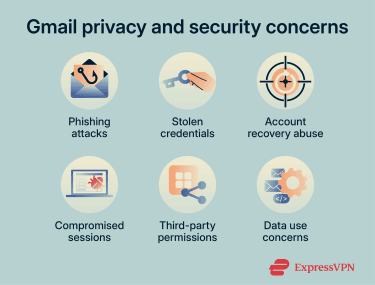
Phishing attacks
Phishing occurs when an attacker impersonates a trusted organization or contact to trick users into revealing sensitive information, opening malicious attachments, or following links to fraudulent websites.
Although Google states that Gmail filters most phishing attempts, no filtering system detects every malicious message. Attackers may also send phishing emails from compromised legitimate accounts, making the sender appear familiar or trusted. Email was the most commonly reported method scammers used to contact people in the Federal Trade Commission's (FTC's) 2024 data.
Successful phishing attacks can lead to account compromise, identity theft, malware infections, data theft, and financial fraud.
Stolen or reused credentials
Gmail accounts may be compromised through stolen passwords, password reuse, phishing, or malware on a signed-in device. Reusing a password increases the risk because credentials exposed through another service may also work for the associated Google Account.
Google states that it monitors for suspicious sign-ins, alerts users to unusual activity, and may restrict sign-in methods it identifies as potentially compromised.
Also read: What does a compromised password mean? A simple guide to staying safe online.
Account recovery abuse
Many online services allow users to reset their passwords, usually by sending a link or code to their registered email address. If an attacker gains access to a Gmail account, they may use this functionality to take over other accounts linked to that address.
An attacker with Gmail access may also alter forwarding rules, filters, mail delegation, or recovery details to intercept messages or retain access. Under Google's account security process, Google lists unfamiliar changes to these settings as signs of possible account compromise.
Also read: What to do if your email is hacked.
Third-party app permissions
Gmail allows users to connect third-party apps to their Google Account. These apps can request different levels of access, ranging from basic profile information to permission to read, send, modify, or delete email.
Broad app permissions can create privacy and security risks if an app misuses its access, is compromised, or retains data outside Google's systems. Google displays the requested permissions before granting access and allows connections to be removed. Google also requires many public apps requesting sensitive or restricted permissions to undergo verification, and some must complete recurring security assessments. However, verification doesn't guarantee that an app is free of all security or privacy risks.
Data privacy concerns
Google's Privacy Policy states that it collects and processes email content and related information, such as sender and recipient addresses and timestamps. Depending on the service and account settings, Google says it uses this information to provide, maintain, improve, personalize, and protect its services.
How Gmail data is used for AI depends on the account, feature, and settings. Google states that Workspace content is not used to train the generative AI models underlying services outside Workspace without permission. For personal accounts, Gmail content and activity may be processed to provide and improve enabled smart features such as Smart Reply and Smart Compose.
Google also states that when a personal account connects Gmail and other Workspace apps to Gemini through Personal Intelligence, summaries, excerpts, and inferences drawn from relevant emails may be used to improve services and train generative AI models if Keep Activity is enabled. However, Google doesn't train these models directly on the user's entire Gmail inbox or use Gmail message content to personalize advertisements.
Also read: Google Gmail AI security risks and how to protect your inbox.
Is Gmail HIPAA compliant?
Consumer Gmail accounts aren't covered by Google's Health Insurance Portability and Accountability Act (HIPAA) Business Associate Addendum (BAA). A HIPAA-covered entity or business associate, therefore, can't rely on consumer Gmail to create, receive, maintain, or transmit electronic protected health information (ePHI) on its behalf while satisfying HIPAA's BAA requirement. This doesn't prohibit individuals from receiving or storing their own health information in personal Gmail accounts
Google lists Gmail as covered functionality under its Workspace BAA. Google Workspace can therefore be configured to support an organization's HIPAA compliance efforts, but the organization must enter into Google's BAA before using covered services with ePHI. Compliance also depends on the organization's configuration, risk analysis, policies, access controls, and use of only the services and features covered by the BAA.
Google provides a HIPAA Implementation Guide for Google Workspace. Google describes it as an informational configuration guide; using it doesn't by itself establish HIPAA compliance.
How to make Gmail more secure
The following measures can strengthen your Google Account and reduce common Gmail security concerns.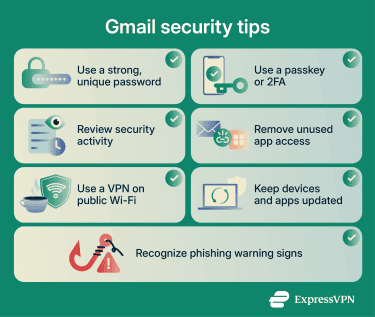
Use a strong password
Use a strong, long password that isn't based on predictable words or personal information. Longer, unpredictable passwords are harder to crack through brute-force attacks. Make it unique, too, so credentials exposed in a data breach elsewhere can't be reused to access a Google Account.
Some password managers like ExpressKeys can generate and store unique passwords in a locally encrypted, zero-knowledge vault. ExpressKeys also supports storing and using passkeys on compatible platforms.
Enable 2-step verification or use a passkey
Gmail Accounts support 2-step verification, which adds another sign-in requirement when you use a password. This reduces the risk of an account being accessed if a password is stolen through phishing, malware, or a data breach.
For stronger phishing resistance, Google supports passkeys as an alternative to passwords and physical security keys as a second verification step. Google describes security keys as its most secure second step, and Google prompts as more secure than SMS codes. Passkeys bypass the separate second step because unlocking the device verifies possession.
Review security activity and account settings
This can help you spot suspicious activity before it becomes a larger security issue. Check your Google Account for:
- Devices or sessions you don't recognize.
- Unusual sign-ins or security events.
- Changes to recovery details.
- Unfamiliar Gmail forwarding rules, filters, or delegates.
Google Security Checkup provides personalized recommendations involving recovery options, sign-in methods, connected apps, and other account settings. Recent security activity and device management provide more detailed information about recognized events and sessions.
If you find any unfamiliar activity, use Google's account security process to review sessions, remove unauthorized access, and change compromised credentials.
Remove unused connected apps
Third-party apps may retain permission to view or modify Gmail and other Google Account data. Review connected apps and remove access that is no longer required.
Revoking access prevents the app from obtaining additional Google Account data. However, Google notes that the app may retain information previously shared with it; deleting that copy may require using the app's own controls
Use public networks carefully
Gmail already uses encrypted HTTPS/TLS connections, so a public Wi-Fi operator generally can't read the contents of the Gmail session. However, attackers may create look-alike hotspots or fraudulent websites to capture credentials.
A virtual private network (VPN) adds encryption between your device and the VPN provider's server, reducing what the local network can observe. However, it doesn't identify fake hotspots, prevent phishing, protect information submitted to a malicious website, or secure an already compromised device.
Keep devices and apps updated
Install updates for your operating system, browser, Gmail app, and security software. Updates frequently correct vulnerabilities that attackers could otherwise exploit. Automatic updates reduce the time devices remain exposed after a fix becomes available.
Learn to recognize phishing red flags
Phishing messages increasingly use polished writing and convincing branding, so spelling mistakes or generic greetings aren't reliable indicators by themselves. More useful warning signs include:
- Look-alike or mismatched sender domains.
- Unexpected links, attachments, or QR codes.
- Urgent threats, warnings, refunds, or rewards.
- Requests for passwords, payment details, or verification codes.
- Unsolicited prompts to approve a sign-in.
- Instructions to bypass normal processes.
Sender addresses and branding can also be spoofed. Verify unexpected requests through the organization's official app or website, or via independently sourced contact details, rather than links or numbers in the message.
Also read: How to protect your email: Step-by-step guide.
FAQ
Can Gmail be hacked easily?
Does Gmail read your emails?
In its Privacy Policy, Google also states that Gmail content isn't used to personalize ads and that employees, contractors, and agents' access to personal information is restricted to those who need it for processing.
Is Gmail safe for online banking?
Gmail's phishing filters and warnings reduce this risk, but can't detect every deceptive message. Google advises going directly to the organization's website rather than entering credentials after clicking a link in an unexpected message.
How safe is Gmail for sending documents?
Eligible Workspace organizations can configure client-side encryption (CSE) or Gmail E2EE, under which Google states that its servers can't access unencrypted message content. For ordinary Gmail attachments, recipients can generally download, copy, or forward the files, so confidentiality also depends on account security, recipient handling, and the document's own protections.
Should you switch from Gmail?
Switching providers doesn't eliminate risks such as phishing, password reuse, malware, compromised devices, or recipient mishandling.
What happens if your Gmail account is compromised?
Google's compromised-account process covers changing the password, reviewing security events and sessions, removing unauthorized access, checking recovery information, and inspecting Gmail settings for unfamiliar changes. Contacts may also need to be notified if the account was used to send deceptive messages.