 Celebrate with up to 80% off
How to stop AI from stealing your art: A practical guide for artists


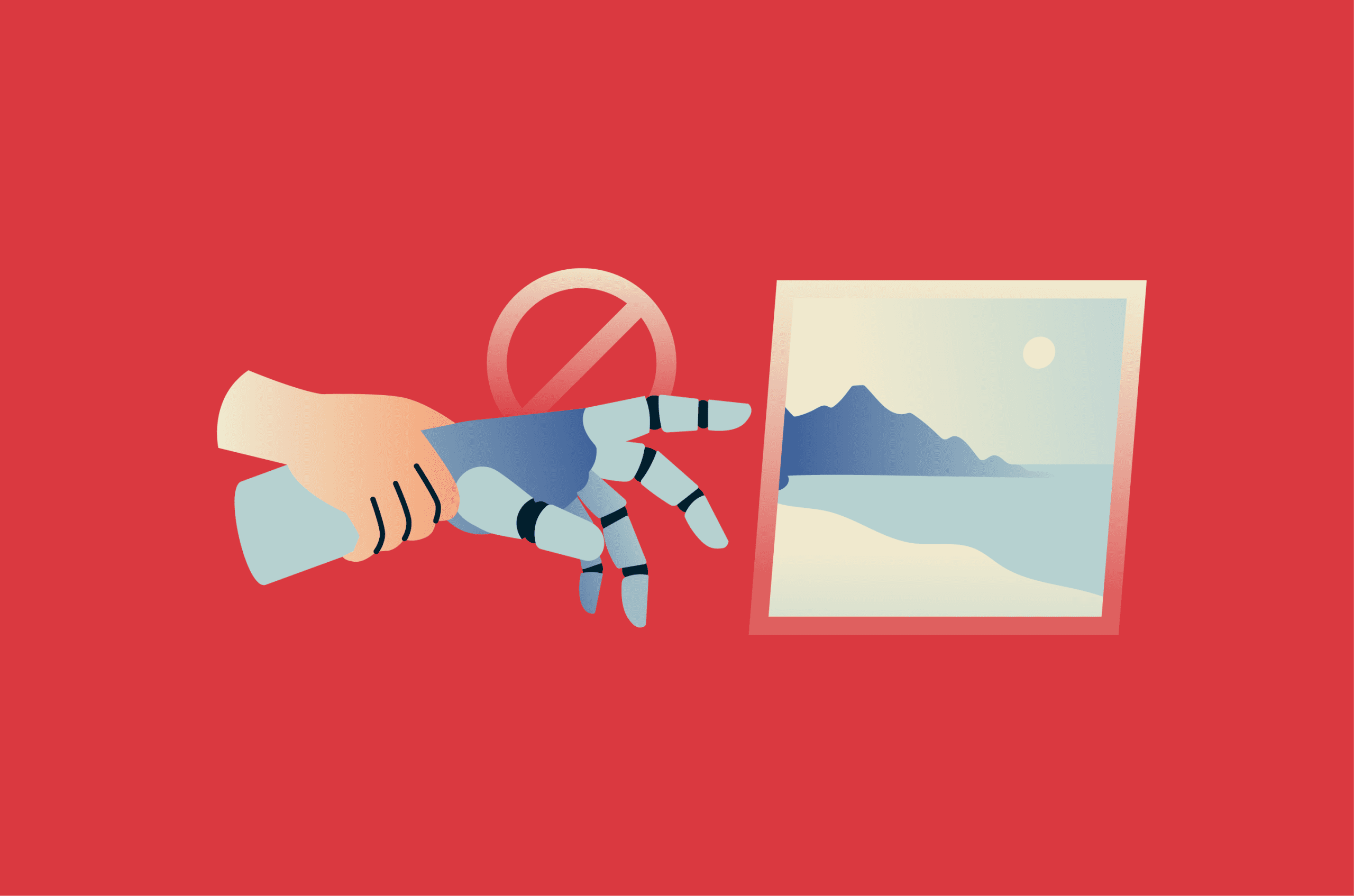
AI image generators are trained on enormous collections of online images, raising concerns about how much control artists have over their work. Responsible AI tools can be built around consent, transparency, privacy, and clear limits on data use, but this guide focuses on the risks of public artwork being scraped, trained on, or imitated without permission.
Completely preventing AI systems from accessing or learning from art is difficult, but artists are not without options.
Please note: This information is for general educational purposes and not financial or legal advice. Consult an intellectual property attorney for specific copyright questions.
What AI use of artwork means for creators
The phrase “AI stealing art” is often used informally to describe two related concerns: training models on artists’ work without consent and generating outputs that imitate a living artist’s style. The legal treatment of these issues is still evolving and varies by jurisdiction.
Artists’ concerns usually fall into three areas:
- Potential loss of income: Clients may commission AI imitations instead of original work.
- Reduced control: Artists may have little say over how their style appears in the wider culture.
- Loss of long-tail value: Past work can appear in training datasets that artists never opted into, potentially generating value for someone else.
How AI training uses public artwork
Image models learn from large datasets. Large-scale Artificial Intelligence Open Network (LAION) compiled LAION-5B, a widely cited dataset index containing around 5.85 billion multilingual image-text pairs collected from the public web. LAION says its datasets contain links and metadata rather than hosting the image files themselves.
Stable Diffusion v1, a deep learning text-to-image model that generates detailed imagery from written and image-based prompts, was trained on LAION-5B and its subsets. Other image systems also rely on large datasets built from public web material.
AI models generally don’t store images like a normal image folder or hard drive. Instead, they learn statistical patterns from training data, including patterns in color, shape, composition, and visual style. However, some models can memorize or reproduce parts of their training data, especially when images are duplicated or strongly associated with certain text prompts. With enough exposure to an artist’s work, a model may be able to approximate or imitate recognizable elements of that style from a text prompt.
Why your creative work may be at risk
The risk is highest when artwork is easy to access, consistently labeled, and widely shared across public platforms. Social feeds, portfolio sites, online galleries, client showcases, and archived versions of a site can all give scrapers access points.
Artists with a recognizable style face a higher risk. The more consistent your visual identity, the more easily a model can capture it. That recognizable look is what makes commissions possible, but also, unfortunately, mimicry.
An artist doesn't have to be famous for this to matter. Some illustrators, photographers, and concept artists have found their work in the LAION-5B index using Have I Been Trained, a search tool built for that purpose. Please note that at the time of writing, Have I Been Trained is listed as under maintenance.
The role of data scraping in AI art misuse
Data scraping is the automated collection of public information from websites by software programs known as crawlers or bots. Scrapers serve different purposes: some feed search engines, some support research, and others collect material for AI training pipelines.
Automated scrapers may not evaluate ownership, licensing terms, copyright notices, or whether an image is sold commercially. Depending on the pipeline, they may collect image URLs, download files, and store captions, alt text, or surrounding page text alongside them.
How to stop AI from using your art
Artists can take several approaches to reduce the risk of their work being scraped and used for AI training, from opt-out signals and platform settings to smarter sharing habits.
Note: These protections are practical, not permanent. Some scrapers ignore opt-out signals, new crawlers regularly emerge, and robots.txt functions as a voluntary standard rather than an enforceable access-control system. Treat each step below as one layer in a defense-in-depth approach, not a guarantee.
Opt out of AI training datasets
A growing set of opt-out mechanisms lets you signal that your work is off-limits for AI training. They aren’t universally honored, though some companies do follow them.
If you run your own website, a robots.txt file at the root of your domain can block specific crawlers by name. Because robots.txt rules are voluntary, they’re best treated as a baseline rather than a guarantee.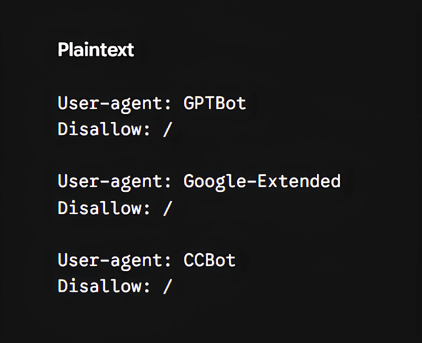
The main crawler names and control tokens to know include:
- GPTBot: OpenAI’s crawler for content that may be used to train generative AI foundation models.
- Google-Extended: Google’s robots.txt product token for managing whether content Google has crawled may be used for future Gemini model training and grounding. It's separate from Google Search indexing and doesn't affect Google Search inclusion or ranking.
- CCBot: Common Crawl’s web crawler. Common Crawl data has been used in many machine learning (ML) and AI training pipelines.
- ClaudeBot: Anthropic’s training-related crawler. Anthropic also lists Claude-User for user-requested retrieval and Claude-SearchBot for search-related indexing.
- Bytespider: A crawler attributed to ByteDance, and commonly discussed as part of AI crawler traffic. Because official documentation is limited, check current crawler records and server logs before relying on a block rule.
- PerplexityBot: Perplexity’s crawler for surfacing and linking websites in search results, not for training AI foundation models, according to Perplexity’s documentation.
For work that may already be in training sets, Spawning’s Do Not Train Registry lets artists flag their images as off-limits for future training, and the same team offers a browser extension that marks work across the web accordingly. At the time of writing, Spawning’s rightsholder tools appear to be under maintenance, so availability may be limited.
The registry has seen real-world adoption: Spawning says media in its Do Not Train Registry were excluded from the training of Stable Diffusion v3. Spawning’s ai.txt is a separate machine-readable file that can be added to a website, similar in structure to robots.txt, but designed specifically to declare AI training permissions.
Adobe's Content Authenticity app, currently in public beta, can embed a Generative AI Training and Usage Preference in Content Credentials, which are based on the Coalition for Content Provenance and Authenticity (C2PA) standard. The preference requests that supported generative AI models don't train on or use the content. Adobe says the preference is currently supported by Adobe Firefly and Spawning. Applying the preference makes work ineligible for Adobe Stock, because Adobe trains Firefly on licensed Adobe Stock content. It can also prevent use in selected Firefly-powered features such as Style Reference, Structure Reference, and Generate Similar.
Strengthen your social media privacy settings
In some regions, Meta trains its AI on public posts and comments from adult Facebook and Instagram users, but has confirmed it doesn't use content from private messages for this training. Setting your account to private can reduce future public exposure, but it may not remove posts that were public before the change or act as a full AI-training opt-out.
On Instagram
Go to your profile, open the menu, then go to Settings and activity > Account Privacy, and turn on Private.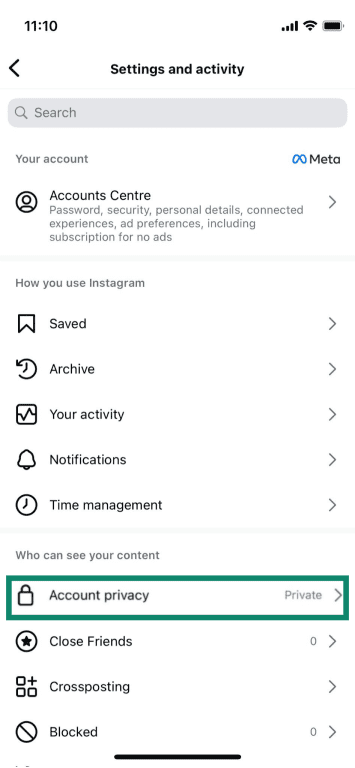
In regions where Meta offers an AI training objection process, such as the EU, users may be able to submit a formal objection via Meta’s Privacy Rights Request Channel or the notification link provided by Meta.
On Facebook
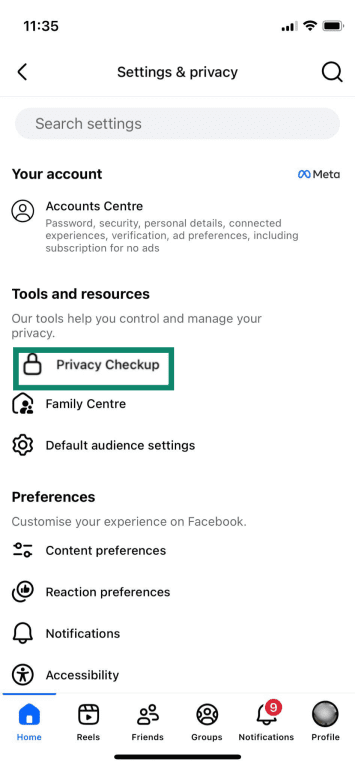
- Manage who can see your posts by opening Settings and privacy > Settings > Privacy Checkup or Privacy.
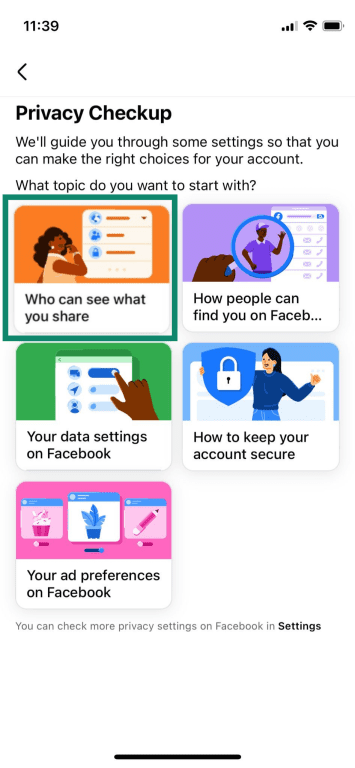
- Tap Who can see what you share.
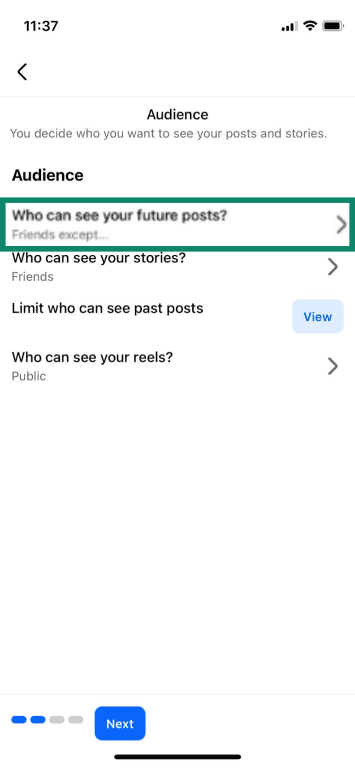
- After tapping Continue and Next, select Who can see your future posts and choose your preference.
In the EU, users can also submit an objection request through Meta’s Privacy Center or Privacy Rights Request Channel, where available. One route is:
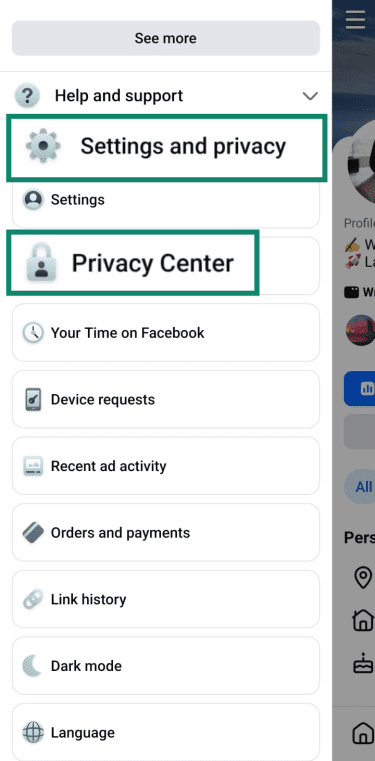
- Go to Settings and privacy > Privacy Center.
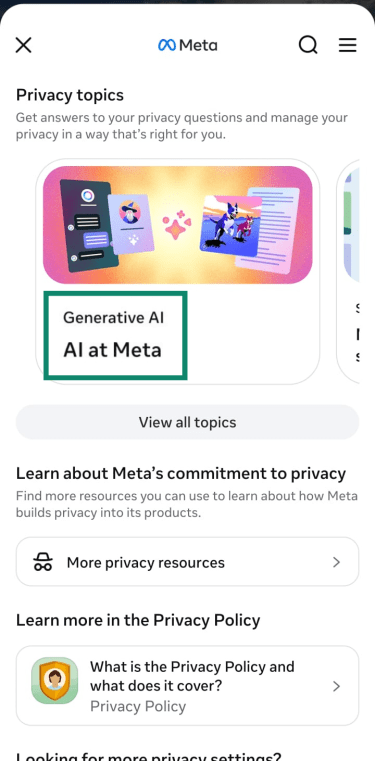
- Under Privacy Topics, tap AI at Meta.
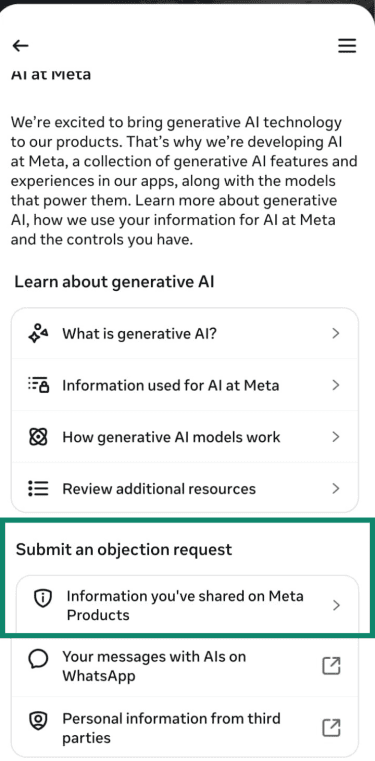
- Under Submit an objection request, tap Information you’ve shared on Meta Products.
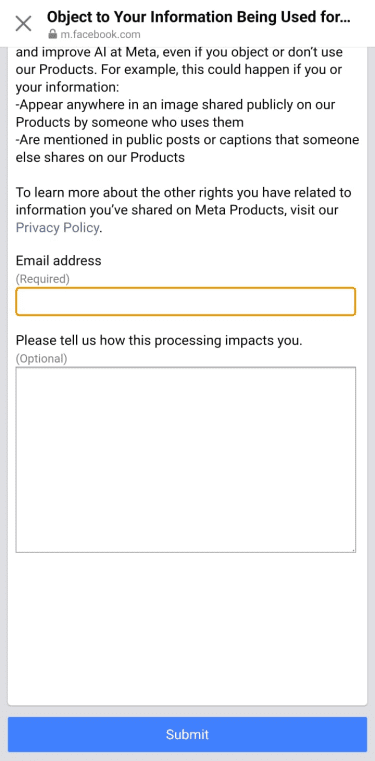
- Enter the email address associated with your profile, briefly explain the objection, and click Submit.
On LinkedIn
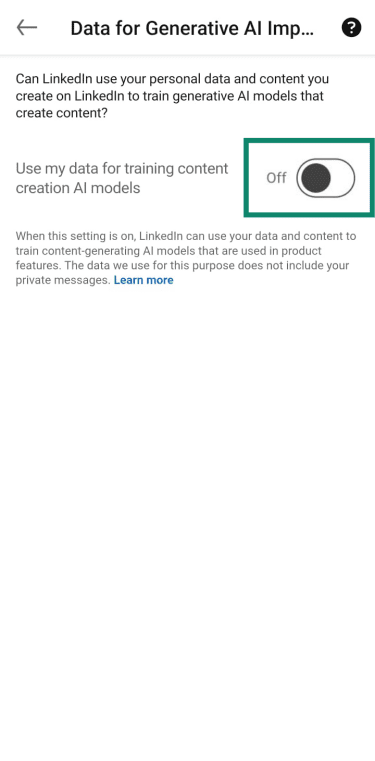
LinkedIn’s Data for Generative AI Improvement setting is on by default unless users opt out. To turn it off:
- Go to Settings or Settings & Privacy.
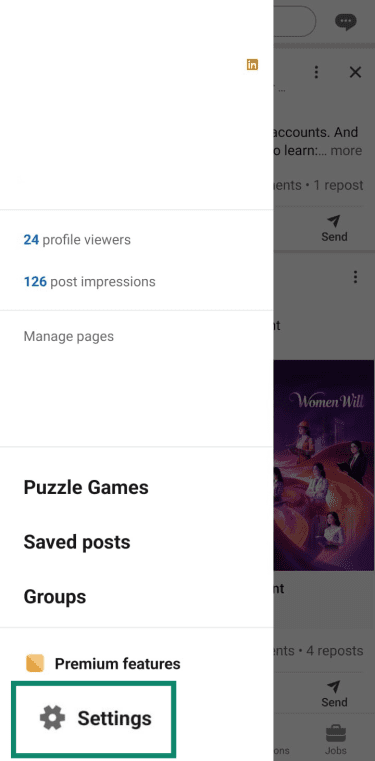
- Click Data privacy > Data for Generative AI Improvement.
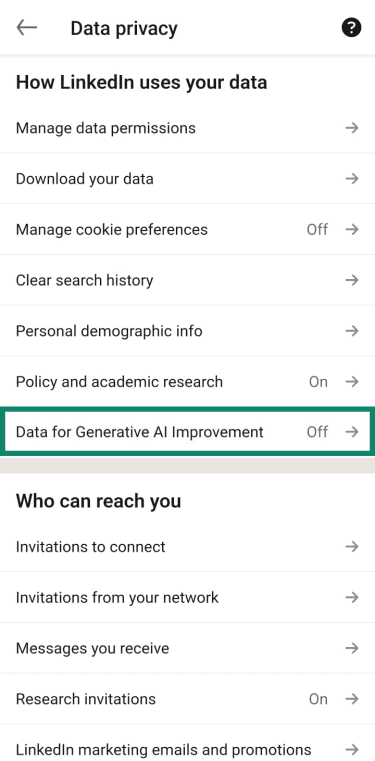
- Make sure the toggle next to Use my data for training content creation AI models is Off.
Read more: Social media privacy: How to protect your data online.
Be intentional about public sharing
Not every piece needs to be public. A few habits can reduce your exposure without hiding your work entirely:
- Post final pieces, not full-resolution works-in-progress (WIP): WIP shots, process images, and high-resolution studies can create more public versions of the same piece for scrapers to collect.
- Resize images for the web: A width of 1,500–2,500 pixels is usually enough for portfolio viewing, depending on layout and image type. Web-optimized files reduce the amount of detail exposed compared with full-resolution originals, but they don't prevent scraping.
- Watermark across important visual areas, not just the corners: A small edge mark can be easier to crop out or remove. A visible, repeated, or centrally placed watermark may be harder to remove cleanly, but watermarks are a deterrent rather than a guarantee.
- Limit cross-posting of high-resolution files: Sharing the same content across multiple public platforms can create a broader scraping footprint. Consider keeping the highest-quality version in one controlled portfolio and using smaller previews elsewhere.
Treat each post as a decision: who needs to see this, at what resolution, and on which platform?
Safely store and share your files
Originals deserve more protection than the JPEGs you post publicly. Keep layered files (Photoshop, Krita, Procreate, and Affinity), raw scans, and version histories entirely off public platforms whenever possible. For client deliveries and proofs, artists can use password-protected file sharing or a password-protected page on their own sites. This is safer than open download links, though it cannot prevent authorized viewers from saving, forwarding, or copying files.
Strong password management matters for portfolio platform accounts, especially when drafts, client proofs, or unpublished work are stored there. A password manager can help create and store strong, unique passwords, while two-factor authentication (2FA), when enabled on the account, adds another layer of protection. ExpressKeys, from ExpressVPN, includes password management and a built-in authenticator for compatible accounts.
Accessing portfolio platforms or uploading files over public Wi-Fi at conventions, cafés, or hotels introduces additional risk. Routing traffic through a virtual private network (VPN) encrypts traffic between the device and the VPN server, which can reduce local-network snooping. HTTPS still matters, and a VPN doesn't hide uploaded files from the platform receiving them.
These habits don’t stop scraping on their own, but they can reduce the risk of account compromise and file exposure.
Use technical tools to protect your artwork
Regarding the technical layer of art protection, specific tools can alter how AI interprets an image, limit access to files, establish proof of authorship, and flag unauthorized use as it occurs.
Cloaking
Cloaking adds subtle pixel-level changes to an image that are designed to look minor to people but disrupt how some AI models learn or imitate an artist’s style. Glaze, built by the University of Chicago's Security, Algorithms, Networking, and Data (SAND) Lab, is one of the main tools available for this. It comes as both a desktop application and a free browser-based web service called WebGlaze.
When a charcoal portrait is run through Glaze before posting, the tool alters the pixels so that a human still sees the original drawing, but an AI model may interpret its style features differently, such as reading them closer to an abstract oil painting. If a model is later trained or fine-tuned on that glazed image, the altered pixels may push the model toward learning the wrong style features, making style imitation less accurate.
Glaze has a few limitations worth knowing:
- It doesn't protect past work: Glazing does nothing for uncloaked images already scraped into existing datasets; only future uploads are affected.
- It can be weakened or bypassed: Researchers have demonstrated attacks that reduce Glaze's effectiveness. The SAND Lab acknowledges this kind of arms race and updates the tool in response, but no version should be treated as permanent protection.
- It can leave visible artifacts: Higher protection settings can make changes more noticeable, especially in images with smooth gradients, flat colors, or large clean areas. Testing on a copy before applying it to a final piece is recommended.
Poisoning
Poisoning is a more assertive form of protection. Nightshade, from the same University of Chicago team, introduces subtle pixel-level changes designed to interfere with how some models interpret training signals. A poisoned image of a dog might train the model to associate the “dog” concept with “cat.” If enough poisoned images enter a training set under the right conditions, outputs for those concepts may begin to degrade.
The goal is to create a deterrent against unlicensed scraping. If training pipelines face a greater risk of unreliable or unusable data, developers may have more reason to license or properly source images.
Both tools can be applied to the same image, and the SAND Lab has confirmed it's testing a combined Glaze/Nightshade release and will publish it when ready. In the meantime, they complement rather than replace each other: Nightshade alone doesn't block style mimicry the way Glaze does. Nightshade's effects can also be more visible in some images, especially at higher intensity settings or on flat or smooth artwork, so checking the result at full size before posting is advised.
Anti-scraping tools for artist websites
Artists running their own portfolio sites have more control over crawler access than on most social platforms, and a few tools go beyond the opt-out signals covered earlier:
- Cloudflare's AI bot blocking: Cloudflare offers a free one-click toggle to block known AI crawlers across sites it protects. The bot rules are updated as new crawlers appear and are available on all plans, including the free plan. This helps protect traffic to the site through Cloudflare, but it cannot remove copies that have already been scraped or hosted elsewhere.
- Web application firewalls (WAFs): Hosts and security tools like Cloudflare, Sucuri, and Wordfence (for WordPress) can rate-limit or block traffic that behaves like a scraper, including some bots that don't clearly identify themselves. They are helpful controls, but they may not catch low-volume or human-like scraping.
- Image hotlink protection: Help prevent other sites from embedding images directly from a portfolio site. This doesn’t block scrapers from downloading images via direct URL, but it does reduce passive exposure and bandwidth use.
For platforms outside an artist's control, protections depend on what the platform enforces on their behalf.
Watermarks, metadata, and provenance standards
Visible watermarks discourage casual copying, but some AI editing tools can use inpainting to remove or paint over marked areas by reconstructing what the image may have looked like underneath. A watermark placed strategically across important parts of an image raises the difficulty, but it isn't a reliable barrier on its own.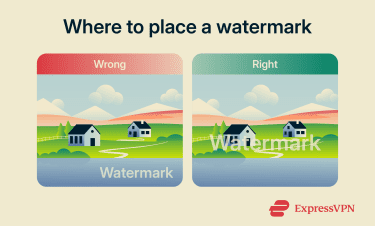
The more durable layer of protection is in the file's metadata. Content Credentials, built on the open C2PA standard developed by Adobe, Microsoft, BBC, and others, work like a digital certificate of origin embedded in or associated with a file. They can record creator identity or attribution details, what software was used, when credentials were applied, and whether a generative AI training and usage preference has been set. The record is cryptographically signed and tamper-evident, meaning later edits outside the trusted provenance chain can be detectable when someone checks the credentials.
Content Credentials won't stop a scraper from copying a file. What they do is create a verifiable provenance and attribution record that can accompany the image in its preservation, which may be useful as supporting evidence if the work turns up somewhere it shouldn’t. They are also gaining recognition across some platforms, tools, and industry groups as a meaningful signal of provenance and attribution.
For artists, the relevant steps are:
- Attach Content Credentials: The free Adobe Content Authenticity app (public beta) allows you to attach Content Credentials and a generative AI training and usage preference to files. This preference is a signal for supported systems, not a universal block.
- Check metadata survives export: Some social platforms strip metadata on upload, so testing that they survive before publishing is recommended.
- Embed standard International Press Telecommunications Council (IPTC) metadata: The free, open-source ExifTool can embed creator name, copyright notice, and contact information into files, providing a lighter-weight attribution record, though without the cryptographic verification of Content Credentials.
Private sharing platforms for sensitive work
Some art platforms position themselves as more cautious about AI scraping and training, but they should not be treated as private storage. Public uploads can still be copied if a scraper ignores platform rules or opt-out signals.
- Cara: An artist-focused portfolio and social platform that grew quickly in 2024. Cara says it filters generative AI images, doesn't train AI models on user content, and applies NoAI tags to posts, though public images may still be vulnerable to scrapers that ignore those signals.
- ArtStation: Supports NoAI tags that users can apply to projects to signal that the work is not permitted for AI use. ArtStation allows AI-generated work under its content rules and requires CreatedWithAI tagging for AI-generated Marketplace content. It also supports NoAI tags that users can apply to prohibit AI training or use, but the tag depends on outside parties honoring ArtStation’s terms and signal.
- DeviantArt: All deviations are automatically labeled as not authorized for use in AI datasets, and DeviantArt opt-outs have historically been added to Spawning’s Do Not Train Registry.
Monitoring tools for unauthorized use
Misuse that goes undetected can't be acted on. A monitoring routine catches problems early:
- Google Lens, TinEye, and Yandex Images: Reverse image search tools that let artists upload their own work and find copies, similar images, or modified versions across indexed parts of the web. They're useful for spotting unauthorized use, uncredited reposts, or misattribution, but they won’t find every instance.
- Google Alerts: A free tool that monitors Google Search results for a name, brand, or username and delivers new mentions by email.
- Pixsy: An image monitoring and copyright enforcement service that automates reverse image searches at scale and helps with takedown notices or recovery claims when a match is found.
Also read: How to deep search yourself and remove personal data from the web.
Understanding legal rights as an artist in the age of AI
Technical protections can reduce some risks, but they can't resolve every rights issue. If a creator believes their work has been misused, legal options may be worth exploring. The law in this area is still developing, with lawsuits, policy reviews, and regulatory debates underway in the U.S., EU, U.K., and elsewhere. Their outcomes may shape what artists can claim and enforce.
What copyright protects and what it doesn't
Copyright protects specific creative expressions: the actual image drawn, painted, or photographed.
It doesn’t protect:
- Style: Under copyright law, a pen-and-ink line treatment, a particular palette, or a way of arranging compositions generally can’t be protected on its own. For example, anyone can paint in Mucha's style, but copying a specific Mucha piece is a different matter.
- Ideas and concepts: The idea of “a girl in a forest with a fox” isn't copyrightable. The specific drawing of one is. A specific drawing of that scene, including its original details, arrangement, and execution, can be.
This creates a real gap in AI. A model that generates work "in the style of" a named artist may not be infringing copyright in the traditional sense because style, by itself, isn't protected. That doesn't mean artists’ concerns are unfounded. Some creators worry that imitation of style could affect commissions, market opportunities, and control over how their artistic identity appears online. Some current lawsuits are testing whether these concerns can be addressed under other legal theories, including unfair competition and right of publicity.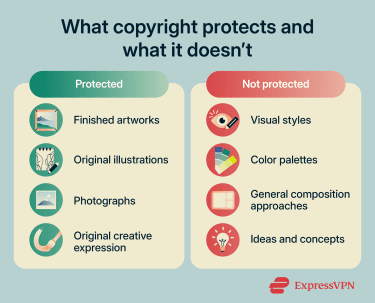
Where things are clearer: if a model’s output copies protected expression from a specific existing work, or is substantially similar to it, the copyright owner may have stronger grounds to act.
Also read: Personal data removal laws: Do they protect you?
How platform terms of service affect your rights
Uploading to a platform means agreeing to terms that grant the platform a license to host, display, process, distribute, and sometimes sublicense or otherwise use that content. The critical point is that once content has been uploaded, the platform may already have stored, processed, distributed, cached, or used it in accordance with its terms. Deleting posts later may reduce future visibility, but it may not undo earlier uses, copies, backups, sublicenses, or training activity.
Those licenses are especially important as platforms move into AI. X (Twitter) current terms explicitly include the use of content for training ML and AI models. Many major platforms have broad content licenses, and some now include explicit language about AI, ML, or model improvement. The details vary by platform.
Before uploading to any platform, search for terms such as "license," "sublicensable," "machine learning," “artificial intelligence,” “AI,” “model,” “training,” “improve services,” “affiliates,” “partners,” and “derivative works.” These terms can provide a clearer picture of which rights are being granted and how uploaded content may be used. Specific platform settings for opting out of AI training are covered in the earlier section.
Legal steps artists can take against AI misuse
If a specific AI output reproduces copyrighted work, several options are available:
- File a Digital Millennium Copyright Act (DMCA) takedown notice: When a copy of your work appears on a hosted platform, such as a website, marketplace, or social feed, a valid DMCA takedown notice may require the host to remove or disable access to the material to preserve safe harbor protection. Most major platforms have submission forms, though the uploader may be able to file a counter-notice. Many countries outside the U.S. have similar notice-and-takedown, copyright complaint, or platform-reporting processes, but the rules and timelines vary by jurisdiction.
- Register the copyright: In the U.S., copyright exists from the moment a work is created. But registering with the U.S. Copyright Office is required to bring a federal infringement lawsuit for a U.S. work. Registering before infringement begins, or within three months of first publication, can also make statutory damages and attorney’s fees available, which can make a significant practical difference.
- Consult an intellectual property (IP) attorney: For repeated misuse, infringement involving commercial AI products, or meaningful financial harm, an IP lawyer familiar with copyright cases can advise which claims have traction in a given jurisdiction.
- Join collective action: For example, Andersen v. Stability AI is a proposed class brought by visual artists against several AI companies. As of early 2026, parts of the case had survived motions to dismiss, including direct copyright infringement and inducement theories, while other claims had been dismissed. Reuters reported that the case was in discovery, with trial set for September 8, 2026.
One practical step worth taking, regardless, is to document everything. Dated original files, screenshots showing where the work was first posted, and records of any communications about misuse all strengthen a legal position if things escalate.
International laws impacting artists
The legal picture varies by region. Here’s a brief rundown:
- EU: The EU Artificial Intelligence Act requires providers of general-purpose AI models to publish a sufficiently detailed summary of the content used to train their models and to have a policy for complying with EU copyright law, including rights-reservation opt-outs under EU text-and-data-mining rules. These obligations for AI model providers began applying in 2025, while enforcement and practical implementation are still developing.
- U.K.: The U.K. government consulted on a proposed copyright exception for AI training that would allow AI companies to use copyrighted works unless rights holders explicitly opted out. Artists and other rights holders pushed back strongly. In its March 2026 report, the government said it would not introduce reforms until it's confident they meet its objectives and noted there is still no consensus on how copyright and AI training should be handled. The U.K. High Court ruling in Getty Images v. Stability AI did not fully resolve whether training on copyrighted images is infringement under U.K. law.
- U.S.: No dedicated AI copyright law exists yet. The U.S. Copyright Office has released reports concluding that purely AI-generated material cannot be copyrighted, while works with meaningful human authorship can be. Its training report also says copyright questions around AI training are fact-specific and that using copyrighted works for training is not automatically fair use.
One broader point worth noting: if work reaches international audiences, the applicable law may depend on where the copying, hosting, distribution, harm, or defendant is located, and on which courts have jurisdiction. Copyright protection is automatic in most countries under the Berne Convention, without requiring registration. A U.S. registration can still be useful evidence and is important for U.S. enforcement, but international enforcement depends on each country’s laws and procedures.
The future of copyright in the age of AI
The cases described above are among the legal disputes most likely to establish an enforceable precedent on whether training AI on copyrighted images constitutes infringement. Depending on the outcomes, companies could face stronger pressure to use licensed training datasets, opt-in systems, or compensation structures for artists whose work shaped existing models.
Legislative movement is also underway in the U.S., though no bill has passed yet. The bipartisan Transparency and Responsibility for Artificial Intelligence Networks (TRAIN) Act would give copyright holders the right to seek access to AI training records to determine whether their work was used. A separate Schiff-Curtis bill, the Copyright Labeling and Ethical AI Reporting (CLEAR) Act, would require generative AI developers to file notices with the U.S. Copyright Office disclosing copyrighted works used in training, with penalties for noncompliance. As of publication, neither proposal has become law, but both reflect growing bipartisan pressure for AI-training transparency.
The practical position for artists in the meantime: use the protections available now, keep thorough records, and track legal and legislative developments as they move.
FAQ
Can private portfolios be scraped by AI systems?
Should artists delete old artwork from the internet?
Do watermarks still help protect digital art?
Watermarks are worth using as a deterrent and as evidence in disputes, but they're not a stand-alone defense. Pairing them with metadata, cloaking, and opt-out signals provides better protection.
What should I do if my art appears in an AI-generated work?
Can metadata prove that I created an artwork?
Are paid portfolio platforms safer than social media?
How often should artists check for unauthorized use?
Can artists use AI tools without losing control of their work?
The U.S. Copyright Office’s position is that works with sufficient human authorship can be protected, but purely AI-generated material is not. Keeping records of human contributions and disclosing AI use through Content Credentials can help support clear provenance.