 Celebrate with up to 80% off
What is an RCS message? Everything you need to know about modern texting


When your phone’s messaging app shows labels like "Chat" and “RCS chat” or displays features like typing indicators and read receipts, your messages are being sent using the Rich Communication Services (RCS) protocol.
What is an RCS message?
An RCS message is a text sent using the RCS protocol. It’s a modern messaging standard that was announced in 2008 by the GSM Association (GSMA), the global mobile industry association.
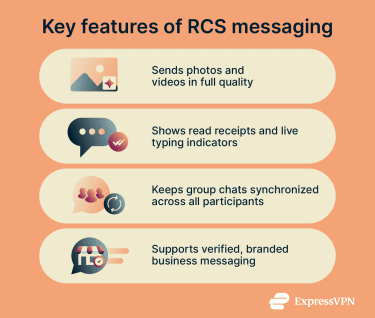
Key features of RCS messaging
RCS supports standard text messages but adds features that bring it closer to modern chat apps. Implementation and availability of features vary across apps and platforms, but some common features are:
- High-resolution media sharing: RCS is capable of sending photos and videos as higher-quality files rather than compressing them before delivery.
- Read receipts and typing indicators: RCS shows when a message has been sent, delivered, and read, as well as displaying a live indicator when someone is composing a reply.
- Improved group messaging: RCS group chats keep all participants in a single synchronized conversation with shared message history. Participants can name the group, add members, and remove themselves.
- Business messaging: Businesses can send verified, branded messages through RCS, including media, suggested replies, and interactive actions. Senders may be verified by the carrier before they can use this channel.
How does RCS messaging work?
RCS uses an internet connection rather than the carrier's SMS path. Once it’s turned on, your messaging app automatically checks whether the person you are contacting also supports RCS and uses it when possible. If they don’t, the message falls back to SMS automatically.
Here’s what happens when you send an RCS message:
- Number registration with an RCS service: The messaging app registers the phone number with an RCS backend run by the carrier or a platform provider like Google. This makes the number recognizable to other RCS-enabled devices.
- Capability check and fallback logic: Before sending, the device checks whether the recipient supports RCS. If they do not, the message automatically switches to SMS or MMS.
- Session setup: The device initiates a connection, confirms RCS capability with the recipient device, and syncs supported features, which enables delivery status, read receipts, and typing indicators to work.
- Message routing over the internet: The message travels over Wi-Fi or mobile data to an RCS server, which forwards it to the recipient.
Where is RCS available?
RCS is supported on most Android devices through Google Messages, which uses Google's own RCS backend when a carrier does not provide it directly. This means RCS works even on carriers that have not formally adopted the standard.
On iPhone, RCS is available from iOS 18 onwards for conversations with Android users. iMessage remains the default between Apple devices.
Carrier support varies by region. In the US, all major carriers, including AT&T, T-Mobile, and Verizon, support RCS.
Who provides RCS?
Unlike regular text messaging, which is always handled by the carrier, RCS can be provided by different parties depending on your device and carrier.
On Android, the RCS backend can be operated in two ways. Some carriers run their own RCS infrastructure and provide the service directly through their network. Others rely on Google’s Jibe platform, either because they don’t operate their own RCS infrastructure or because they have partnered with Google to host their RCS service. If a carrier doesn’t provide RCS at all, the Google Messages app can connect directly to Google’s Jibe servers, allowing Google to provide RCS independently of the carrier.
On iPhone, RCS is provisioned through the carrier’s infrastructure, so the Messages app in iOS simply connects to the carrier’s RCS service to send and receive messages.
How to use RCS messaging
RCS works through your phone's default messaging app. Whether it activates automatically depends on your device, carrier, and region. If it hasn't activated on its own, here's how to enable it.
How to enable RCS on Google Messages
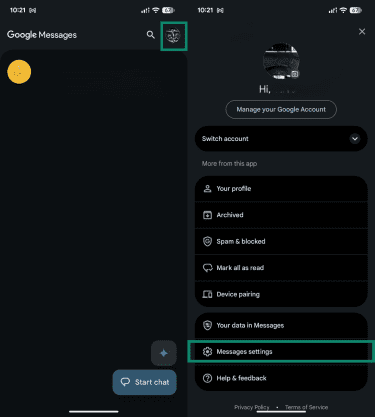
- Open Google Messages, tap your profile icon, and go to Message settings.
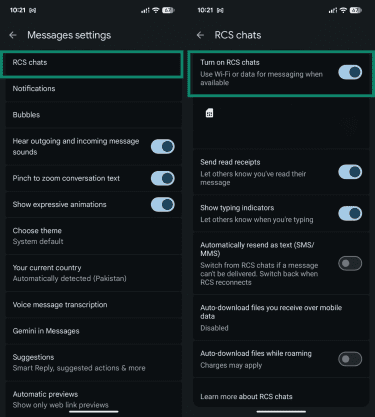
- Tap RCS chats and toggle on the Turn on RCS chats button. Check the status in the same menu and confirm it shows as Connected after activation.
Settings for RCS on iPhone
To enable RCS on an iPhone, you need to have iOS 18 or later, and your carrier must support RCS. Otherwise, the RCS toggle won’t appear.
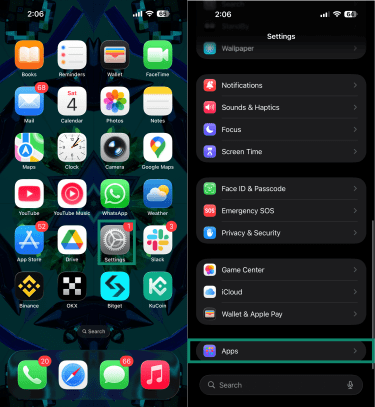
- Tap Settings and scroll down to Apps.
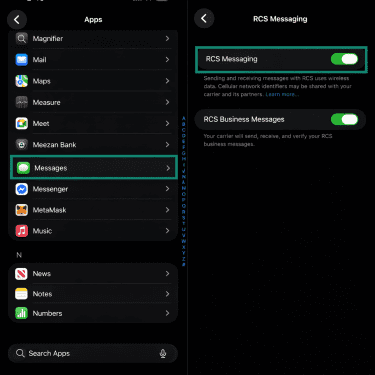
- Tap Messages, then RCS Messaging, and toggle it on.
Security and privacy considerations with RCS
RCS offers protections, but the level of security and privacy depends on which app you use, who you are messaging, and who provides the RCS service.
Are RCS messages encrypted?
RCS messages are usually encrypted in transit using Transport Layer Security (TLS), which protects them as they travel between your device and the RCS server. This prevents interception on the network level, but it doesn’t prevent the server itself from accessing message content.
RCS also supports end-to-end encryption (E2EE), where the message is encrypted on your device before it leaves, so only the recipient can decrypt it. However, it’s only available in specific scenarios.
On Android, Google Messages automatically applies E2EE when both parties are using Google Messages with RCS enabled. But if the other person is using a different RCS app or even an older version of Google Messages, the conversation may only be protected by TLS. Cross-platform conversations between Android and iPhone are also not end-to-end encrypted.
Privacy considerations with RCS
Privacy in RCS depends on the provider and implementation. While RCS message content is generally better protected than SMS, providers can still access some of the same information through:
- Metadata logging: RCS setup and delivery usually generates data that providers can see, including phone numbers, device identifiers, SIM information, IP addresses, and delivery and read status.
- Server visibility: Message content passes through centralized servers during routing and delivery. Whoever operates those servers has access to that content unless it is protected by E2EE.
- Contact capability checks: Every time a conversation is opened, the device queries the RCS server to check whether the other person supports RCS. This happens before any message is sent, meaning your contact list activity passes through the provider’s infrastructure.
How does RCS compare to SMS, MMS, iMessage, and OTT?
To understand which alternative is right for you, it helps to understand what each can do.
- SMS: SMS sends plain text only, has a 160-character limit, and works without mobile data. It has no read receipts or typing indicators. It works on any phone, anywhere, which is still its main advantage.
- MMS: MMS extended SMS to support images, audio, and short videos, but carriers apply strict file size limits and compress media heavily.
- iMessage: iMessage is Apple's proprietary messaging protocol. It offers similar features to RCS but only works between Apple devices. When an iMessage reaches a non-Apple device, it falls back to SMS if RCS isn’t supported on both devices.
- Over-the-top (OTT) apps: OTT apps such as WhatsApp and Signal run over the internet independently of the carrier. They offer the richest feature sets and the strongest encryption options, but require both parties to have the same app installed.
RCS offers the feature set of iMessage and OTT apps, works across Android and iPhone without a separate download, and is beginning to replace SMS and MMS as the default for cross-platform messaging.
The main trade-off compared to OTT apps is encryption. Signal and WhatsApp apply E2EE by default across all conversations, while RCS encryption currently only works in specific scenarios.
| Feature | SMS | MMS | RCS | iMessage | OTT apps |
| Works over data or Wi-Fi | No | No | Yes | Yes | Yes |
| Supports high-resolution media | No | Yes, with heavy compression | Yes | Yes | Yes |
| Read receipts | No | No | Yes | Yes | Yes |
| Typing indicators | No | No | Yes | Yes | Yes |
| E2EE | No | No | Yes, in Google Messages between Android users | Yes | Depends on the app |
| Built into native phone app | Yes | Yes | Yes | Yes (Apple only) | No |
| Cross-platform compatibility | Yes | Yes | Yes | No | Depends on the app |
How to keep RCS messages secure
RCS protection depends on the app, provider, and conversation type, so it helps to check which protections apply in each chat.
- Use Google Messages on Android: It’s one of the most widely available RCS apps that applies E2EE to RCS chats. Without it, conversations are only protected by TLS.
- Use a virtual private network (VPN) on untrusted networks: RCS messages are encrypted in transit using TLS, but a VPN like ExpressVPN adds an extra layer of protection if E2EE isn’t available.
- Check encryption status before sending: Look for a lock icon or something similar in your messaging app. E2EE only applies when both parties are using Google Messages with RCS enabled. Avoid sharing sensitive information if it is not active.
- Turn off read receipts and typing indicators: These are on by default and share real-time information with everyone you message. Disable them in Google Messages under Settings, then RCS chats.
- Check for verified sender badges on business messages: RCS includes a verification system for businesses. A verified badge means the carrier or platform has confirmed the sender.
Common RCS issues and troubleshooting
When RCS fails to activate, your messaging app can get stuck in a pending verification state or continue sending messages as SMS or MMS. Here are some common RCS issues and how to fix them.
RCS won’t activate
Activation issues usually come from number verification, app setup, or missing carrier support.
- Check number verification: Go to your RCS settings and confirm your number is correct. If it shows "Connecting" or "Trouble connecting," verify your number in RCS settings and make sure your phone can receive SMS.
- Turn RCS off and on: Go to the RCS settings and toggle RCS chats off and then back on. Note that if you leave RCS off for 30 days, you may be removed from RCS group chats.
- Update and set your messaging app as default: Make sure your messaging app is up to date and set as the default SMS app. In Google Messages, RCS setup can fail if Google Messages is not the default SMS app.
- Confirm SIM and network connection: Check that your SIM is active, properly inserted, and connected to a mobile network. Google Messages requires internet access and the ability to receive SMS during number verification. On iPhone, you also need a carrier plan that supports RCS.
- Fix carrier or SIM conflicts: Dual SIM setups or recently changed numbers can interrupt activation. On Google Messages, dual SIM devices can have RCS issues if they’re not configured correctly.
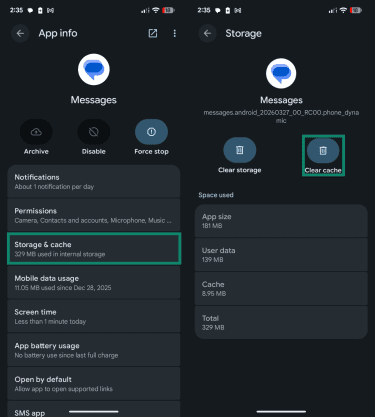
If none of the above works, try clearing the messaging app's cache. To clear the cache on Google Messages:
- Go to Settings, then Apps, and tap the default messaging app.
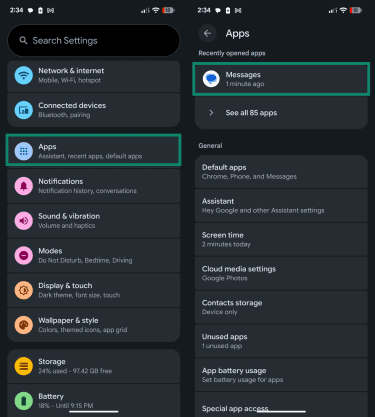
- Next, tap Storage & cache, then tap the Clear cache button.
RCS keeps falling back to SMS
Fallback happens when RCS conditions aren’t met for a specific message or participant.
- Check recipient compatibility: Confirm the other person has RCS enabled on their device.
- Check your internet connection: RCS requires an active data connection. Connect to Wi-Fi or enable mobile data.
- Verify carrier support: Confirm RCS is supported in your region and on your carrier. On iPhone, RCS availability depends entirely on carrier support. If your carrier doesn’t support it, RCS will not be available regardless of your iOS version.
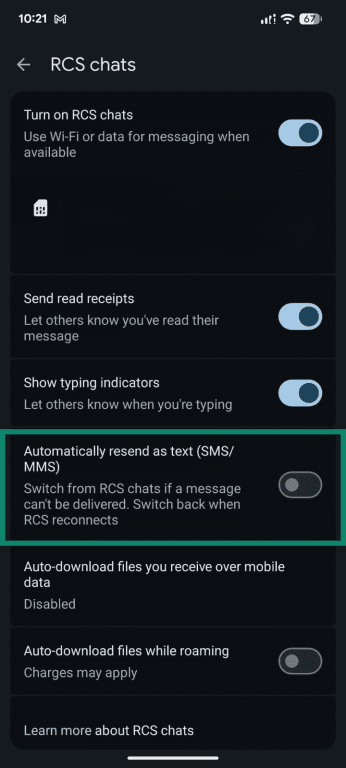
- Disable automatic SMS fallback: In Google Messages, you can turn off the option to automatically resend as SMS when RCS is unavailable. On iPhone, this option isn’t available.
Read receipts not showing
Read receipts only work in RCS chats and depend on settings on both participants' devices.
- Enable read receipts: Open messaging settings and turn on read receipts.
- Confirm recipient settings: Ask the other person to enable read receipts on their device. Both sides must have the feature turned on.
- Check chat type: Make sure the conversation uses RCS and not SMS. SMS messages don’t support read receipts.
Media sending as low quality despite RCS being on
Media quality depends on app settings and network conditions, not just whether RCS is active.
- Check media quality settings: Open messaging settings and select higher-quality options if available. On Android, check Google Messages settings.
- Disable data-saving modes: Turn off any low-data or data-saver settings that send compressed files instead of full-resolution media. On Android, check both Google Messages settings and your device's data saver mode. On iPhone, check Settings, then Mobile Data, and confirm Low Data Mode is off.
- Check your connection: A weak or unstable connection can affect how media is sent. Switch to a stable Wi-Fi connection if possible.
Group chats not working properly
RCS group chats break when not all participants support RCS or when the chat session falls out of sync. If even one participant lacks RCS, the conversation can downgrade to MMS or be split into separate threads, causing missing messages or inconsistent delivery.
Issues also appear after changes like switching devices, SIM cards, or phone numbers. In these cases, the group’s participant list or session state may not update correctly across all devices. Creating a new group chat usually fixes this by re-establishing a clean session with the correct participants.
FAQ
Is Rich Communication Services (RCS) messaging free?
Does Rich Communication Services (RCS) work without mobile data?
Can Rich Communication Services (RCS) messages be sent internationally?
Does Rich Communication Services (RCS) work in airplane mode?
Can I use Rich Communication Services (RCS) in group chats?
What happens if the other person doesn’t have Rich Communication Services (RCS)?